Webflow Alternatives
Webflow Alternatives: Publishing, CMS and Total Cost
Compare Webflow with Framer, Squarespace, Wix, WordPress and a maintained codebase, using dated price screenshots and current publishing documentation.
| Vendor | Pricing | Turnaround | Best for |
|---|---|---|---|
| Webflow | September snapshot: Basic $15, Premium $25/month billed yearly; platform extras | Depends on scope | Baseline: a visual CMS and plan-specific publishing workflow |
| Framer | September snapshot: free, $10 or $30/month, plus editor and usage extras | Test a representative build | A different visual-building and motion workflow |
| Squarespace | September snapshot: $19 / $29 / $49 / $99 monthly equivalent, annual | Content and configuration dependent | Template-led sites managed by the business owner |
| Wix | September snapshot: free; $17 / $29 / $39 / $159 monthly equivalent | Content and configuration dependent | A website combined with required business tools |
| WordPress.com | September snapshot: $4 / $8 / $25 / $45 introductory monthly equivalent | Theme and migration dependent | An editorial team wanting WordPress and plugins |
| A maintained Next.js or Astro site | Build + commercial hosting + usage + team access + maintenance | Project dependent | Repository control and custom functionality with technical ownership |
| SUURThat’s us | Migration from $6,000; optional care $1,500/month; hosting separate | About two weeks for an agreed scope of up to 20 pages | A disclosed publisher option for a managed migration |
- Pricing
- September snapshot: Basic $15, Premium $25/month billed yearly; platform extras
- Turnaround
- Depends on scope
- Best for
- Baseline: a visual CMS and plan-specific publishing workflow
- Pricing
- September snapshot: free, $10 or $30/month, plus editor and usage extras
- Turnaround
- Test a representative build
- Best for
- A different visual-building and motion workflow
- Pricing
- September snapshot: $19 / $29 / $49 / $99 monthly equivalent, annual
- Turnaround
- Content and configuration dependent
- Best for
- Template-led sites managed by the business owner
- Pricing
- September snapshot: free; $17 / $29 / $39 / $159 monthly equivalent
- Turnaround
- Content and configuration dependent
- Best for
- A website combined with required business tools
- Pricing
- September snapshot: $4 / $8 / $25 / $45 introductory monthly equivalent
- Turnaround
- Theme and migration dependent
- Best for
- An editorial team wanting WordPress and plugins
- Pricing
- Build + commercial hosting + usage + team access + maintenance
- Turnaround
- Project dependent
- Best for
- Repository control and custom functionality with technical ownership
- Pricing
- Migration from $6,000; optional care $1,500/month; hosting separate
- Turnaround
- About two weeks for an agreed scope of up to 20 pages
- Best for
- A disclosed publisher option for a managed migration
The right Webflow alternative solves a requirement your present setup cannot meet economically. Start with a concrete publishing task, content model or integration. Then compare the total bill and the people needed to operate the replacement.
Key Takeaways
- Webflow has branching and staging capabilities on specified plans.
- Base plan prices do not include every team, usage or service cost.
- Another builder can be a useful change; a codebase adds its own technical responsibilities.
- September screenshots are retained as historical evidence, not relabeled current prices.
New to the platform? What Webflow is explains the basic product before this comparison.
Test the publishing workflow before deciding to leave
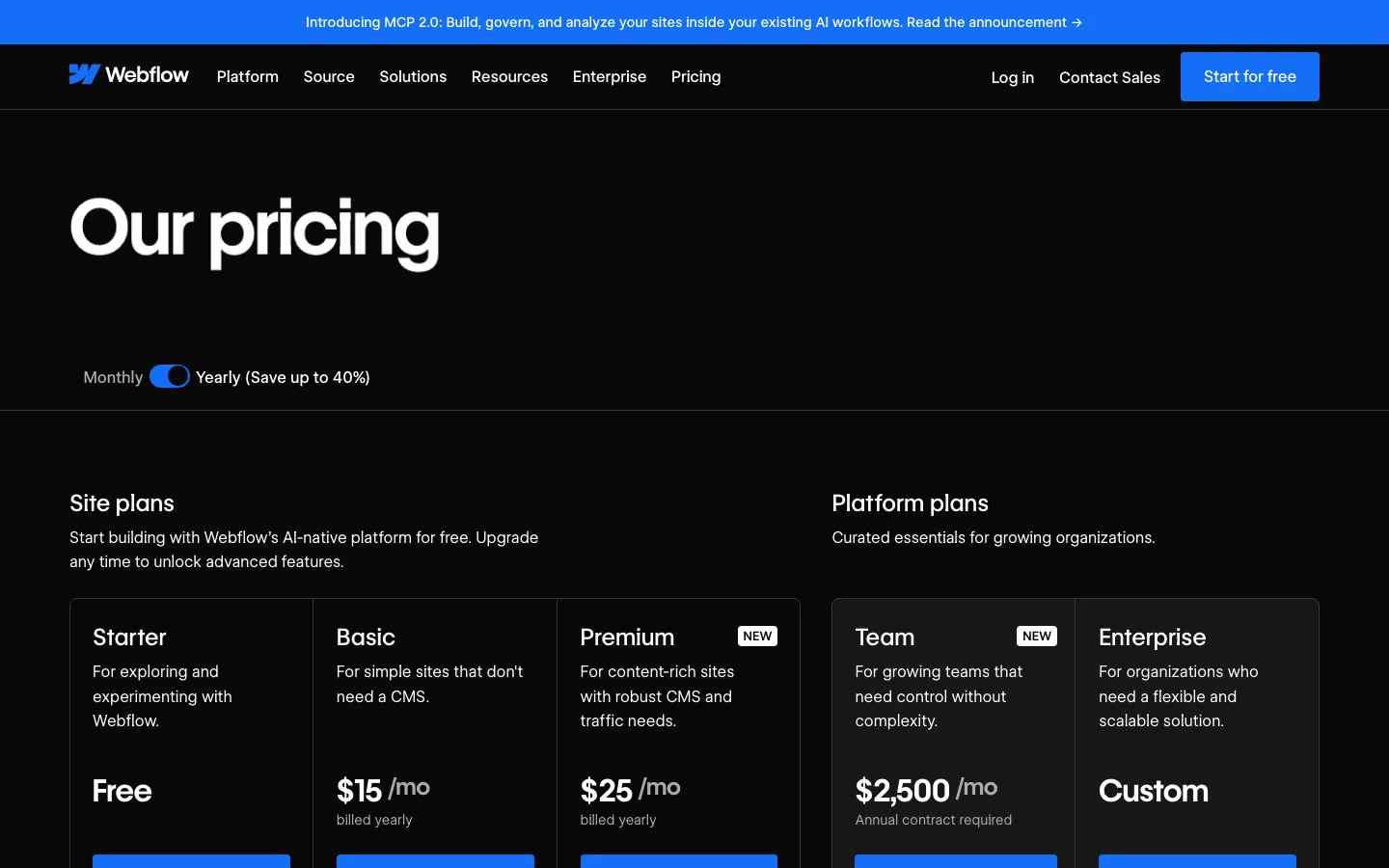
The practical question is whether a campaign can be prepared and reviewed while other changes are in progress. Webflow documents page branching and per-branch staging on Team and Enterprise Platform plans. Its enhanced publishing workflow covers Designer, Staging and Production for Enterprise customers and partners.
Those facts correct a common comparison error: Webflow is not a platform with no staging or branching. Availability, cost and permissions still need to fit the project.
Run the exact scenario with your team: one person changes a shared component, another prepares a campaign, and an approver needs to see the campaign before release. Record which changes can be isolated, who can publish and which plan is required.
Framer: compare the editing experience and real content
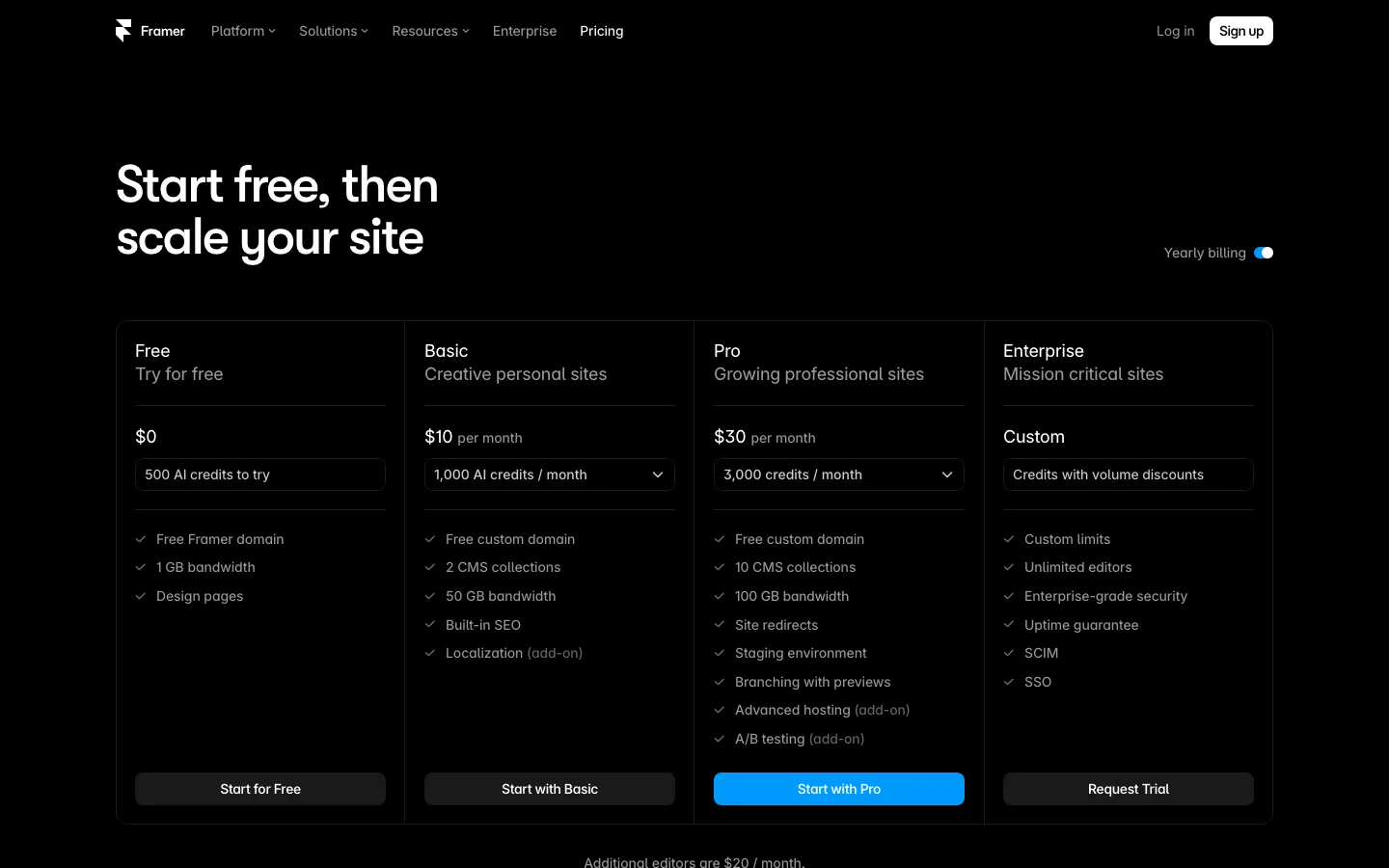
Framer is worth testing when the designer wants a different building and motion workflow. It is not automatically faster for every team or cheaper at every tier. In the recorded prices, $30 was greater than Webflow's $25 site plan before extras.
Framer's CMS supports single and multiple collection references. Recreate an article, author and topic relationship rather than evaluating CMS depth from a slogan. Have the eventual editor add content and repair a mistake.
Before making portability a reason to choose it, read the Framer alternatives comparison: Framer's current official export articles conflict, so a sample export requires testing.
Squarespace: test a template against actual content
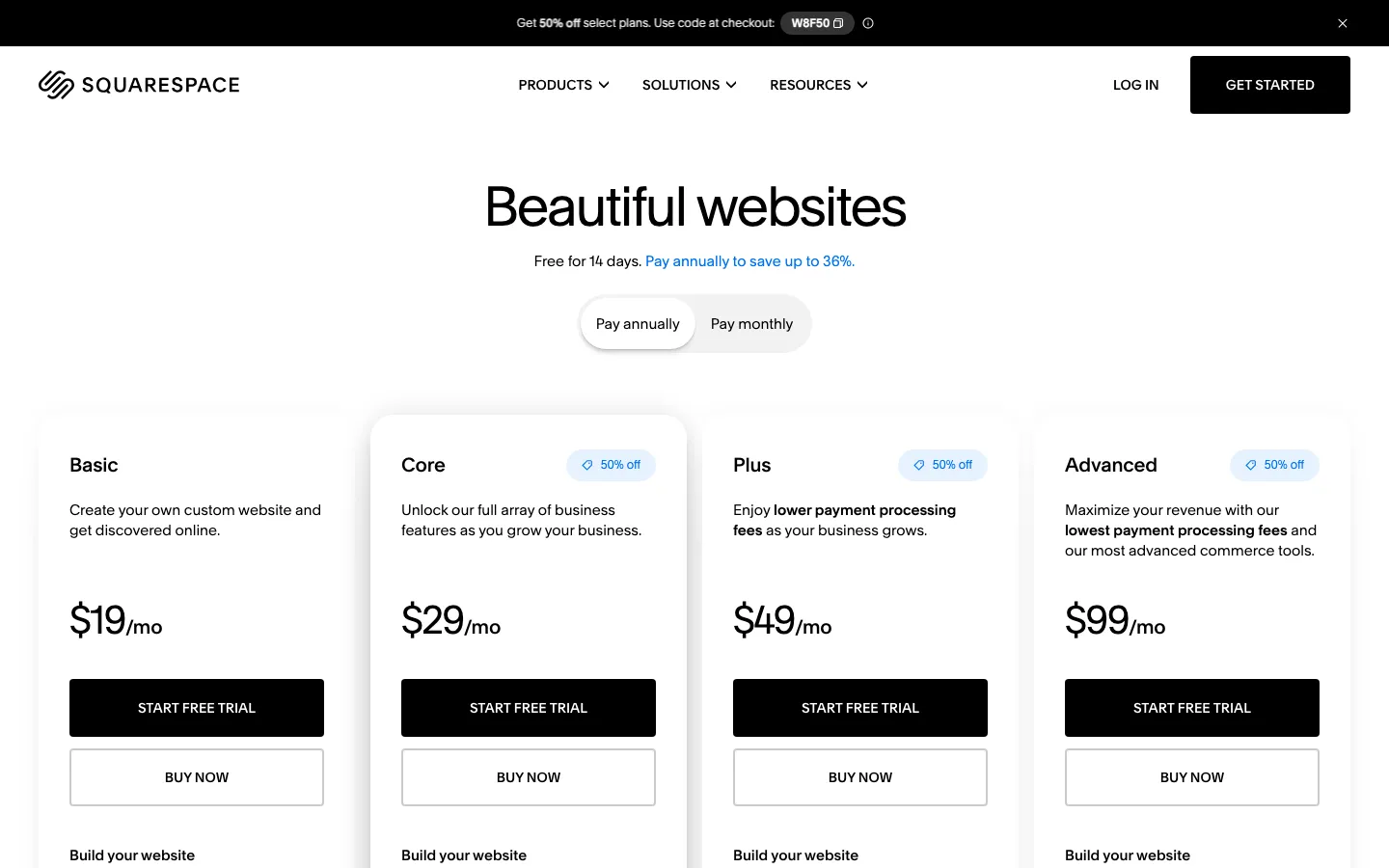
A template-led site can fit a business owner who mostly changes text, images and service information. Test the longest headline, the most complicated service page and the mobile navigation before committing. A polished sample page does not establish that your content will fit.
Squarespace's partial XML export includes certain pages, one blog and text/images, while styles and several content types do not transfer. Keep that distinction between content portability and site portability in the plan.
The Squarespace alternatives guide examines store and export requirements in more detail.
Wix: evaluate the business tools as part of the site
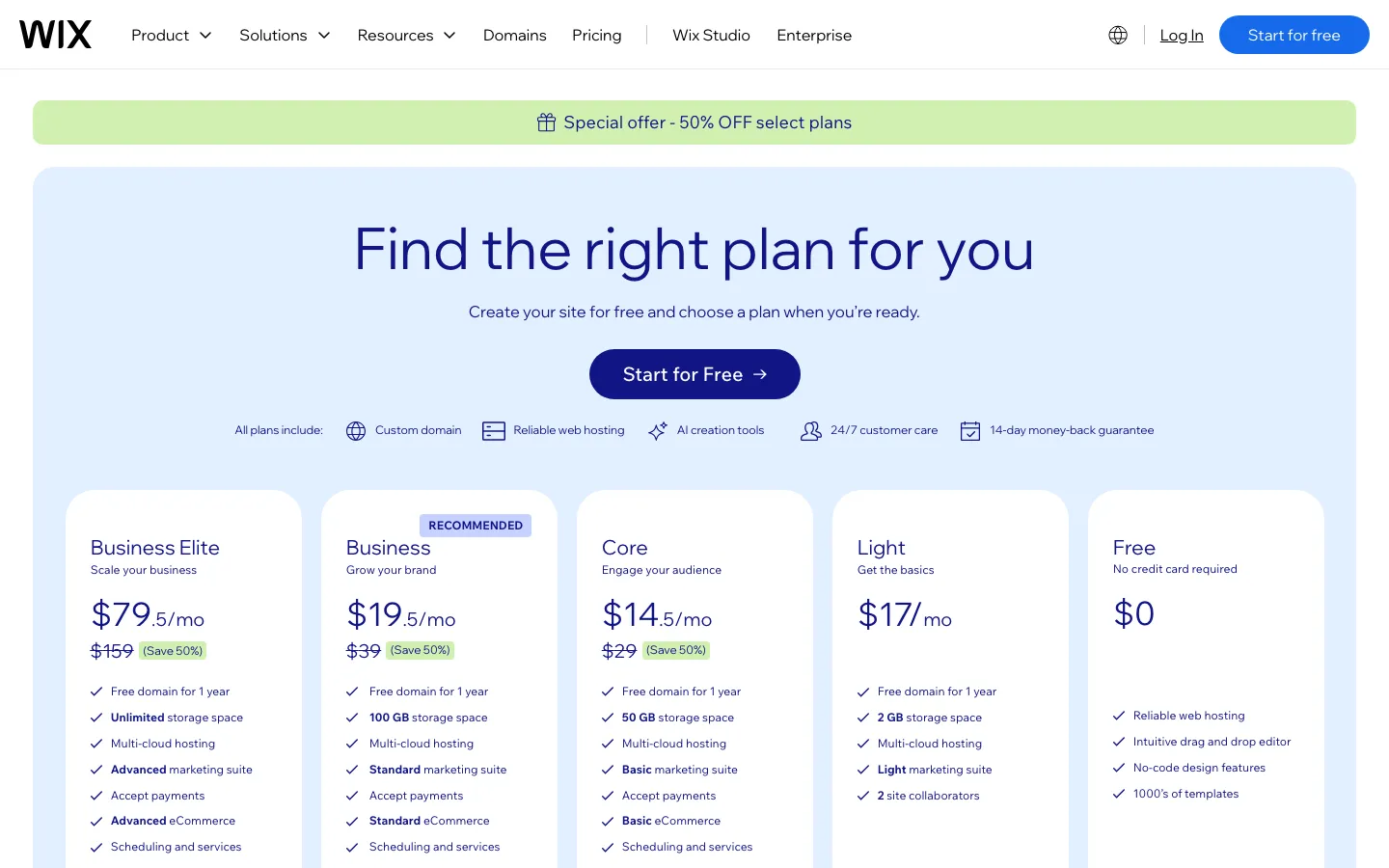
Wix is a candidate when the website also needs a business workflow such as bookings or ordering. Use an end-to-end test: make an enquiry or order, check the notification, update the record and review the customer-facing confirmation.
Wix documents test sites and release management, so “no staging” is not a valid blanket objection. Confirm what can be tested in the editor you use and how the release relates to live data.
See Wix alternatives for the separate migration-inventory problem.
WordPress.com: compare the editorial workflow and ongoing responsibilities
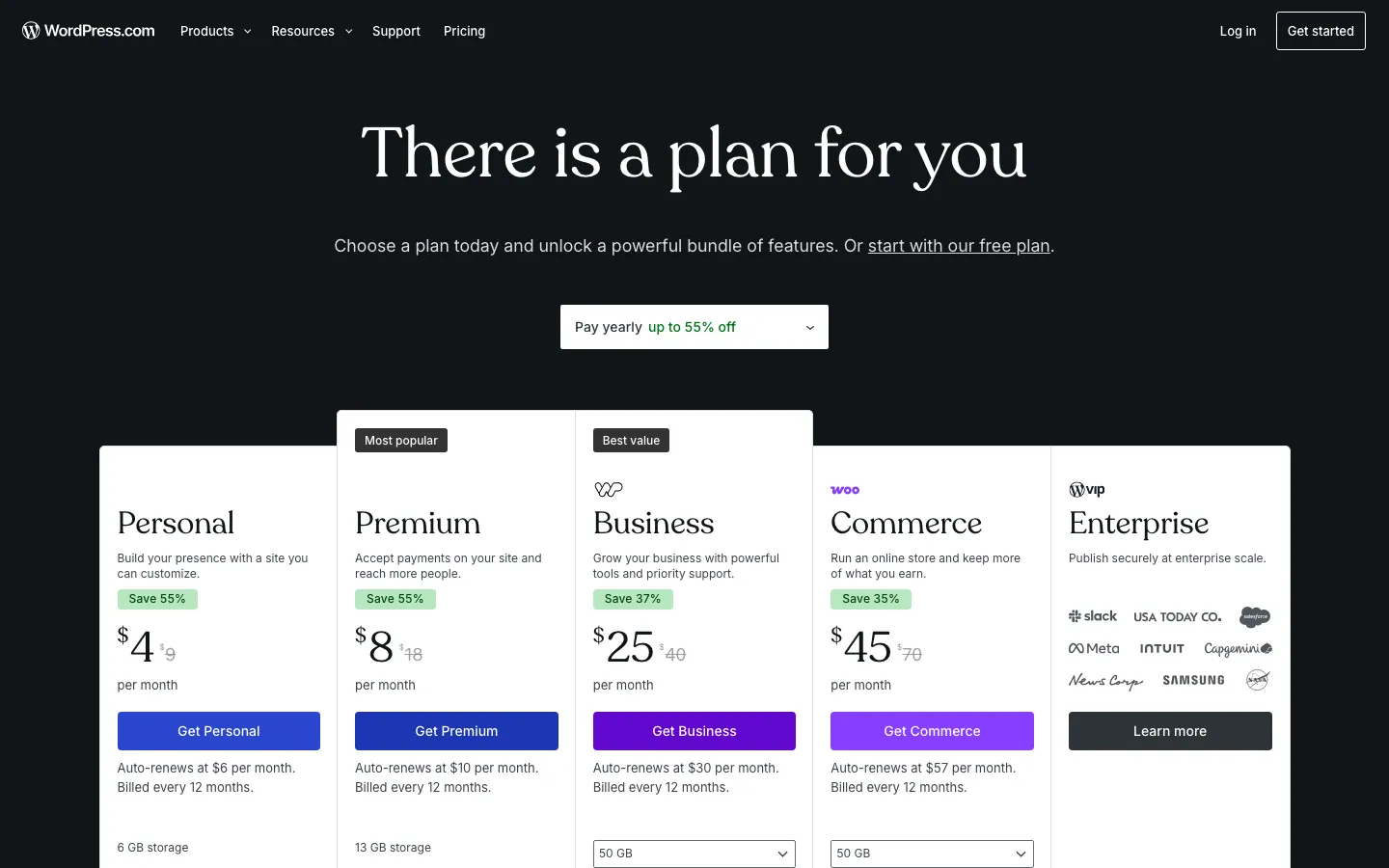
WordPress.com may fit an editorial team that wants WordPress and its plugin ecosystem. Plugins are available on all paid plans, not only Business.
Keep hosted WordPress.com distinct from self-hosted WordPress. For either, identify who manages plugins, backups, content and access. Performance and security depend on the implementation and operating practices; neither is established by the platform name.
The WordPress alternatives guide starts with whether a hosting change would solve the problem without replacing the CMS.
A codebase: control over implementation, with an operating plan
A Next.js or Astro project can give a team version control, reviewable changes and configurable deployments. Preview URLs depend on the chosen hosting and workflow, while the CMS, forms and analytics need explicit implementation.
Vercel's Hobby plan is for personal noncommercial use. Paid seats and usage pricing still matter for a business. A repository does not remove those costs or guarantee unlimited collaborators in every connected service.
Ask who will update dependencies, investigate failed forms, restore a broken deployment and help the marketing team publish. Agents can assist with code and checks, but someone must review and operate the resulting system.
Compare a complete year of costs
Use your own inputs in this model:
| Cost | Builder setup | Maintained codebase |
|---|---|---|
| Initial work | Design, content and configuration | Design, implementation and migration |
| Recurring platform | Site, workspace, editors, usage, add-ons | Hosting, team access, CMS, usage, integrations |
| Operations | Internal time or support retainer | Internal technical time or support retainer |
| Future changes | Scope and available platform features | Development and testing scope |
For an illustrative calculation, $6,000 of migration plus twelve months of $1,500 care totals $24,000 before hosting. A hypothetical $25/month builder plan totals $300 before extras and labor. These are different bundles, not proof that one is the better value.
Moving safely, if the requirement justifies it
SUUR, the publisher, offers migration from $6,000 for an agreed scope of up to twenty pages, with optional care at $1,500/month and hosting separate. Treat that disclosed offer as a proposal to compare.
Inventory URLs, content, redirects, forms and analytics. Test the replacement and keep a rollback plan. Google advises mapping URLs, implementing redirects and monitoring the move, and warns of possible temporary ranking fluctuations.
Keep Webflow if its visual workflow, CMS and plan terms suit the team. Move when a tested replacement meets a specific requirement at a cost you understand.
Sources, commercial interests and corrections
Frequently asked questions
Yes. Current documentation describes page branching with branch staging on Team and Enterprise Platform plans, and an enhanced Designer-to-Staging-to-Production workflow for Enterprise customers and partners. Check the eligibility and controls required for your project.
It depends on the plan, editors, content and usage. The September snapshot included Framer at $10 and $30/month and Webflow at $15 and $25/month, so even those base prices do not support a blanket cheaper claim. Compare current checkout totals for the same requirements.
Not automatically. Vercel Hobby is restricted to personal noncommercial use, and commercial hosting may charge for seats, usage and supporting services. Include CMS, form delivery, monitoring and maintenance as well as the base hosting plan.
Careful URL mapping, redirects, metadata and monitoring reduce avoidable errors, but they do not guarantee unchanged rankings. Google warns that temporary fluctuations may occur during a site move.
Want to talk to SUUR directly?
We work with founders shipping product, not just decks.