WordPress Alternatives
WordPress Alternatives: Change the CMS or Fix the Hosting?
Compare managed WordPress, visual builders, Ghost and a maintained codebase by editorial needs, integrations and operating cost, with dated price evidence.
| Vendor | Pricing | Turnaround | Best for |
|---|---|---|---|
| WordPress.com | September snapshot: $4 / $8 / $25 / $45 introductory monthly equivalent | Hosted WordPress baseline | Keeping a WordPress editorial workflow with managed hosting |
| WP Engine | September observation: Essential from $28/month on annual billing | Migration scope dependent | Investigating managed hosting while keeping WordPress |
| Kinsta | September observation: from $30/month on annual billing | Migration scope dependent | Investigating managed hosting and support |
| Webflow | September snapshot: Basic $15, Premium $25/month billed yearly | Content-model and design dependent | A designer-managed visual CMS |
| Framer | September snapshot: free, $10 or $30/month; editor and usage extras | Content and design dependent | A different visual-building and motion workflow |
| Squarespace | September snapshot: $19 / $29 / $49 / $99 monthly equivalent, annual | Content and configuration dependent | Template-led sites edited by their owner |
| Wix | September snapshot: free; $17 / $29 / $39 / $159 monthly equivalent | Content and configuration dependent | A website combined with required business tools |
| Ghost | September observation: Ghost(Pro) $18 / $29 / $199 monthly equivalent; member limits differ | Content and membership migration dependent | A publication, newsletter or membership workflow |
| A maintained Next.js or Astro site | Build, commercial hosting, CMS, integrations and maintenance | Project dependent | Custom implementation with technical ownership |
| SUURThat’s us | Migration from $6,000; optional care $1,500/month; hosting separate | About two weeks for agreed scope of up to 20 pages | A disclosed publisher option for a managed move to code |
- Pricing
- September snapshot: $4 / $8 / $25 / $45 introductory monthly equivalent
- Turnaround
- Hosted WordPress baseline
- Best for
- Keeping a WordPress editorial workflow with managed hosting
- Pricing
- September observation: Essential from $28/month on annual billing
- Turnaround
- Migration scope dependent
- Best for
- Investigating managed hosting while keeping WordPress
- Pricing
- September observation: from $30/month on annual billing
- Turnaround
- Migration scope dependent
- Best for
- Investigating managed hosting and support
- Pricing
- September snapshot: Basic $15, Premium $25/month billed yearly
- Turnaround
- Content-model and design dependent
- Best for
- A designer-managed visual CMS
- Pricing
- September snapshot: free, $10 or $30/month; editor and usage extras
- Turnaround
- Content and design dependent
- Best for
- A different visual-building and motion workflow
- Pricing
- September snapshot: $19 / $29 / $49 / $99 monthly equivalent, annual
- Turnaround
- Content and configuration dependent
- Best for
- Template-led sites edited by their owner
- Pricing
- September snapshot: free; $17 / $29 / $39 / $159 monthly equivalent
- Turnaround
- Content and configuration dependent
- Best for
- A website combined with required business tools
- Pricing
- September observation: Ghost(Pro) $18 / $29 / $199 monthly equivalent; member limits differ
- Turnaround
- Content and membership migration dependent
- Best for
- A publication, newsletter or membership workflow
- Pricing
- Build, commercial hosting, CMS, integrations and maintenance
- Turnaround
- Project dependent
- Best for
- Custom implementation with technical ownership
- Pricing
- Migration from $6,000; optional care $1,500/month; hosting separate
- Turnaround
- About two weeks for agreed scope of up to 20 pages
- Best for
- A disclosed publisher option for a managed move to code
Before choosing a WordPress alternative, decide whether you need a different CMS or better operation of the one you have. Hosting problems, an awkward editing interface and a missing product feature are different jobs. A full migration can be unnecessary if only one layer is failing.
Key Takeaways
- Keep WordPress.com separate from self-hosted WordPress in the comparison.
- WordPress.com permits plugins on all paid plans under its current documentation.
- Measure performance and inventory plugin functions before deciding to rebuild.
- September prices below are dated observations, not current renewal quotes.
Identify which layer is causing the problem
List the recurring problems and their owner. Slow editing may come from the theme or page builder. Failed forms may come from a mail service or integration. Unclear patching responsibility may be a support-contract issue. None proves that WordPress itself must be replaced.
For performance, inspect representative pages and use Core Web Vitals measurements. A count of plugins, a large HTML file or a single laboratory result does not establish every visitor's experience. Compare the proposed replacement using the same content and important third-party scripts.
WordPress.com and managed hosting: keep the editorial investment
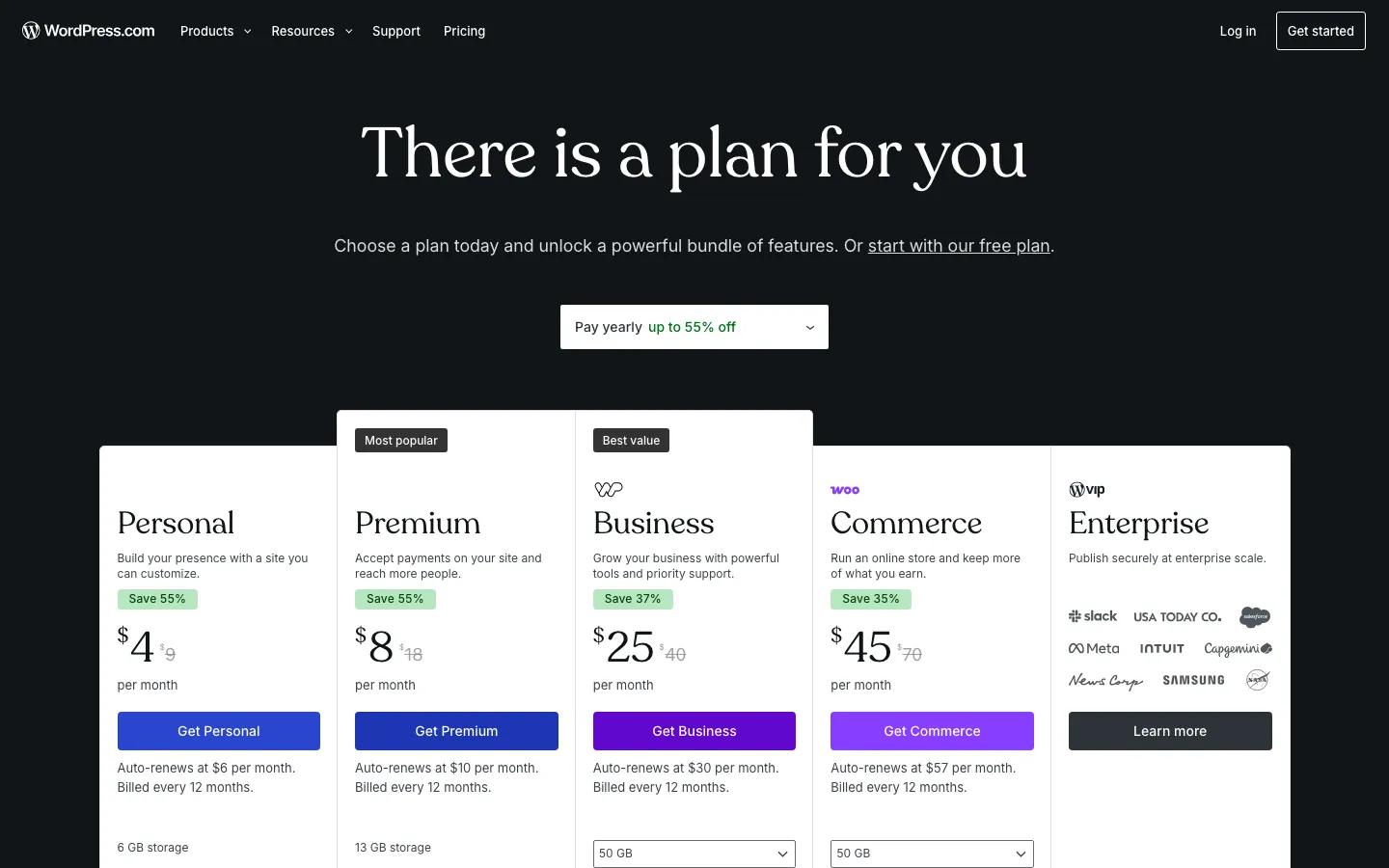
WordPress.com is a hosted service. Its current plugin documentation permits installation on all paid plans. A comparison that says plugins begin at Business is out of date.
Self-hosted WordPress uses a chosen hosting provider. A managed host may take on specified operating tasks while preserving your content and familiar editor. Confirm who handles core updates, plugin conflicts, restores, security incidents and testing after changes.

Those historical entry prices are useful context, not comparable current quotes. Ask each host to price your actual sites, traffic, storage and support needs. A host migration can preserve the CMS while changing its operation; it cannot automatically fix an unsuitable theme or workflow.
Webflow and Framer: test the content model before the design
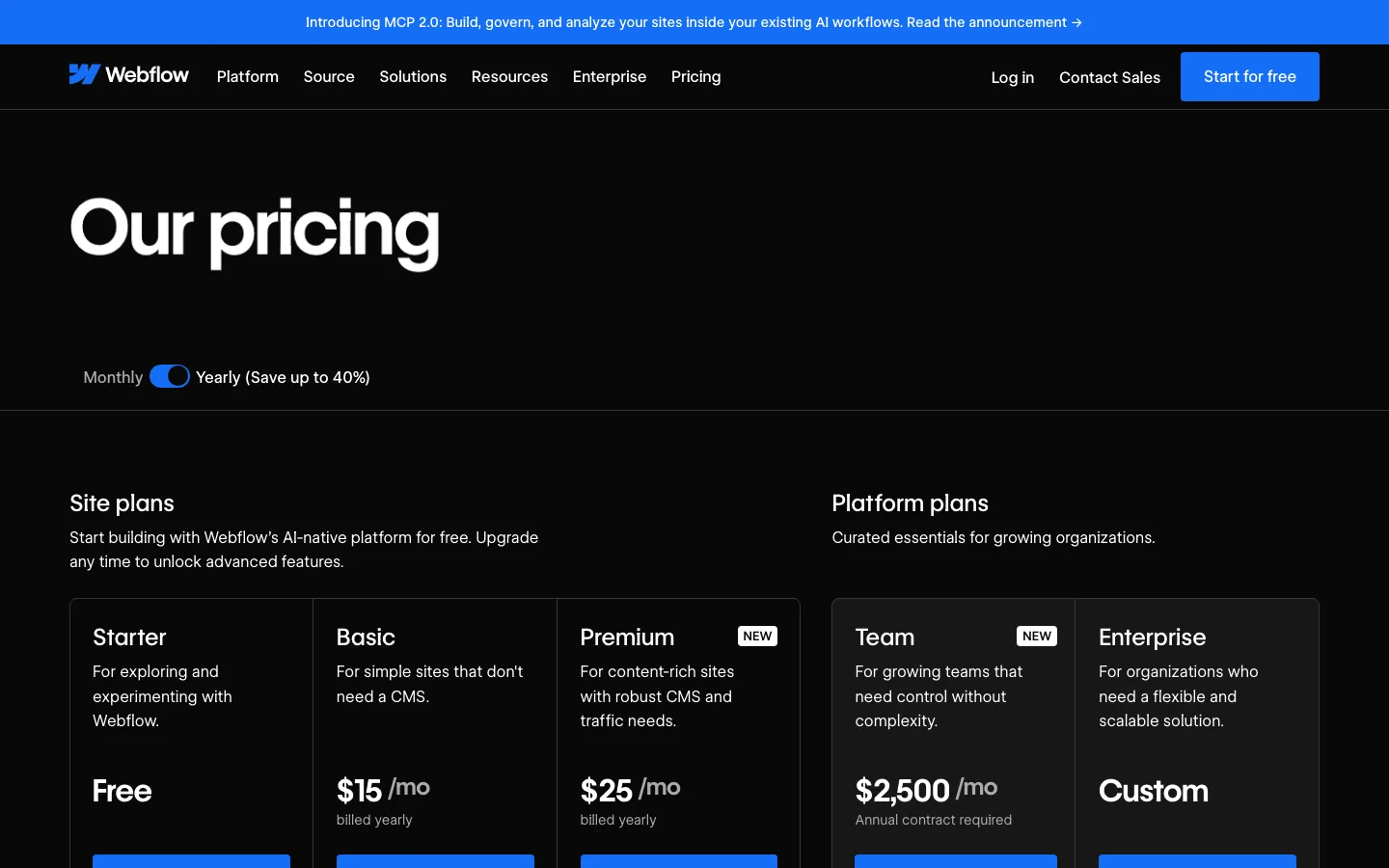
Webflow is a candidate when a designer will maintain the visual CMS. Recreate representative content types, relationships and templates, then test editing with the people who will use them. Its page branching and staging are available on specified Team and Enterprise Platform plans; they are not absent.
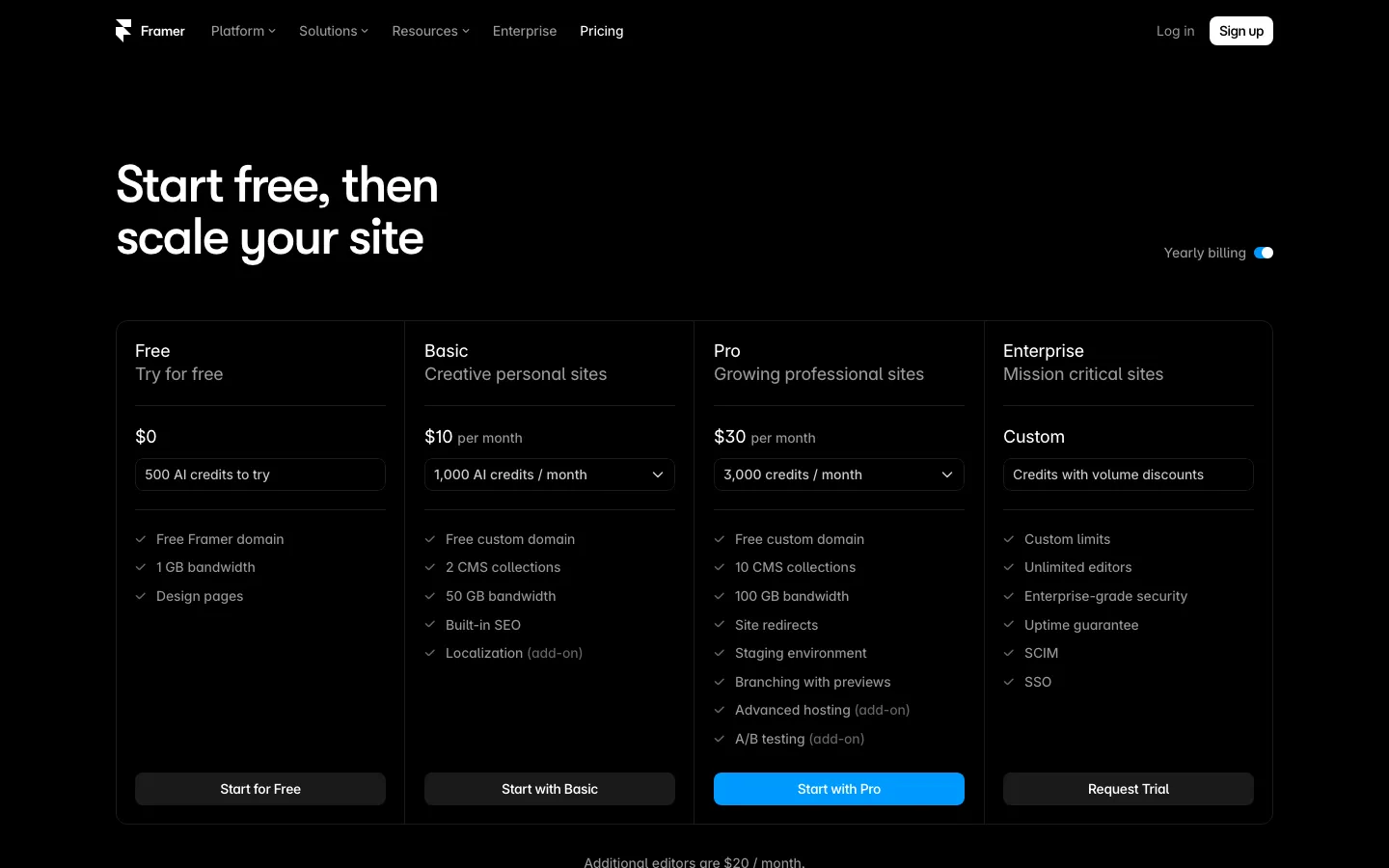
Framer supports single and multiple CMS references. Test taxonomy, authors, related content and the editorial process rather than assuming it cannot model relationships. Its official export articles conflict, which the Framer alternatives guide explains.
In either case, inventory WordPress features that will need a replacement: search, forms, redirects, membership, commerce or custom fields. A successful homepage rebuild is not proof that the full site has transferred.
Squarespace and Wix: test the routine edits
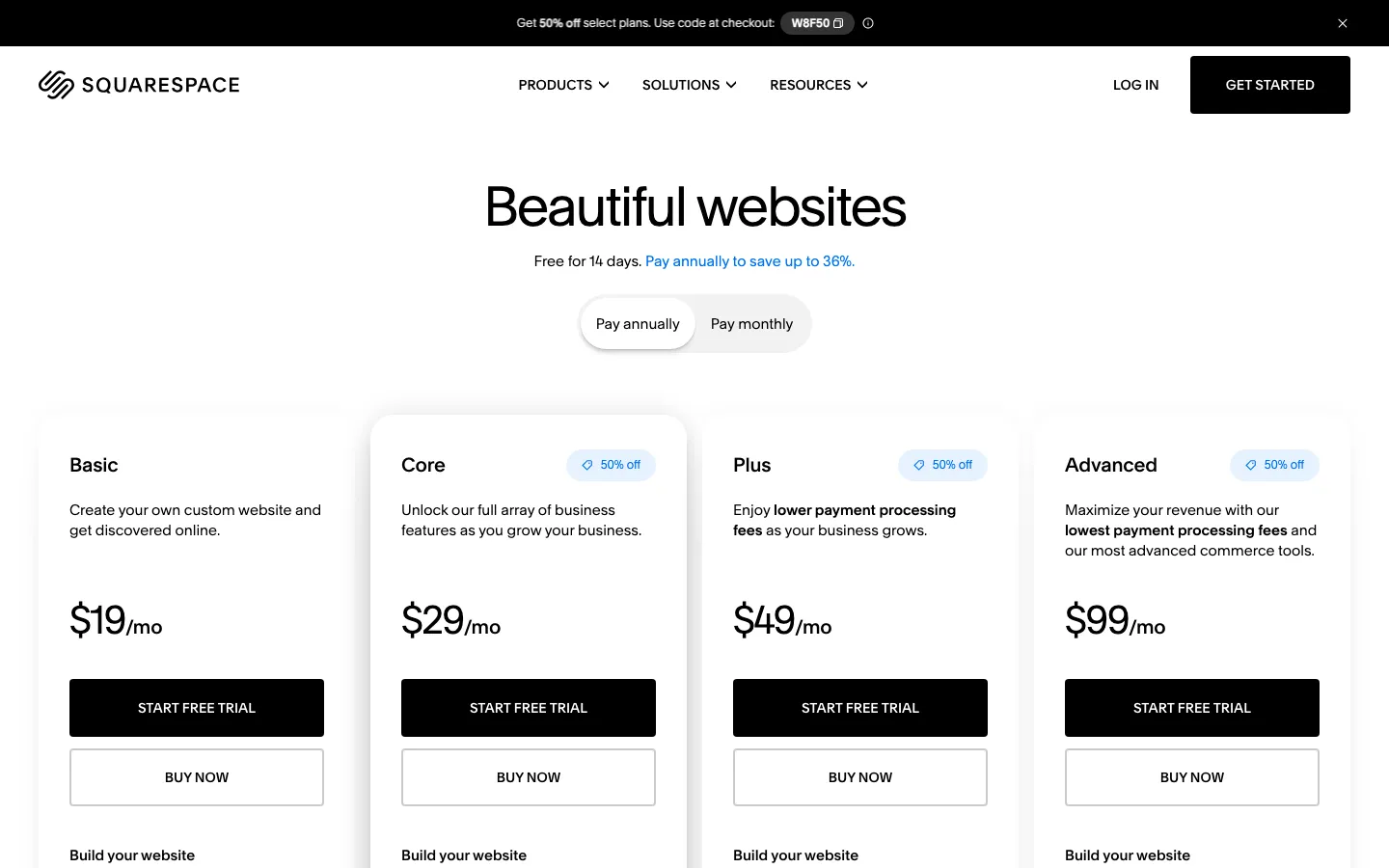
Squarespace and Wix are candidates for an owner-managed business site. Ask the eventual operator to update a service, replace an image and correct a mobile layout. Check whether the required booking, ordering or other business function works all the way through to the staff workflow.
Hosted builders reduce some server responsibilities, but content, permissions, forms, integrations and account security still need an owner. Wix documents test sites and release management. Squarespace's export is partial, so record its content-transfer limits before choosing.
Ghost: evaluate the publication and membership workflow

Ghost is a candidate when publishing, newsletters or membership are central. Test a representative article, subscriber journey and paid-member flow if relevant. Confirm import behavior for authors, tags, images and existing members.
Check required marketing pages and integrations too. A publication workflow can fit while a separate custom feature still needs development. Do not assume an entire archive or membership setup can migrate in an afternoon.
Code: replace every function deliberately
A Next.js or Astro project can place implementation and review in a repository. Its operating responsibilities remain. Forms need delivery and spam handling; membership needs authentication and billing; metadata needs correct implementation; updates need review.
Use a plugin-function inventory:
| Existing function | Replacement question |
|---|---|
| Forms | Who receives submissions, and how is delivery monitored? |
| Commerce or membership | Which service owns payments, accounts and records? |
| SEO metadata | How are titles, canonicals, redirects and sitemaps maintained? |
| Media | How are assets stored, transformed and backed up? |
| Editorial roles | Who can draft, approve and publish? |
| Security and recovery | Who updates dependencies and restores service? |
Vercel Hobby is personal and noncommercial; paid seats and usage matter for business hosting. Code does not automatically mean free collaboration or no recurring services.
Price and test the complete move
SUUR is the publisher and offers migration from $6,000 for an agreed scope of up to twenty pages, with optional care at $1,500/month and hosting separate. The first-year arithmetic for those inputs is $24,000 before hosting, not a few dollars of hosting alone.
Compare that with improving the existing site, changing host and moving to a builder. Include content transfer, testing, support and your team's time.
If you move, follow a URL map and test redirects, forms, access and analytics. Google's site-move guidance warns of possible temporary ranking fluctuations. Choose the smallest change that solves the observed problem while keeping the functions your team relies on.
Sources, commercial interests and corrections
Frequently asked questions
No. WordPress.com is a hosted service; self-hosted WordPress is software operated on a chosen host. Compare hosting, support, access and plugin responsibilities separately. Current WordPress.com documentation allows plugins on all paid plans, not only Business.
Not necessarily. Measure real page behavior and identify the cause first. Images, scripts, third-party integrations, caching and implementation choices matter on every platform. A technology label is not a Core Web Vitals result.
It may help when the problem is server operations, backups or support. Confirm exactly which updates, restores, performance work and plugin issues are covered. A hosting move does not automatically redesign the editing workflow or replace a problematic integration.
Inventory each plugin's function. Some features can be implemented directly; others need a service or integration, and some require substantial custom work. Forms, commerce, memberships, security and analytics do not disappear as responsibilities because the plugin is removed.
A careful migration can preserve URLs and content signals and reduce avoidable errors, but no provider can guarantee unchanged rankings. Google recommends mapping, redirects and monitoring and warns that temporary fluctuations can occur.
Want to talk to SUUR directly?
We work with founders shipping product, not just decks.