
SUUR Things · free & open source · macOS
Things 3,
meet your agent.
An MCP server + local dashboard that gives Claude safe hands on your to-dos, and gives you the views Things never shipped.
Requires Things 3 on macOS. This is a companion for your existing Things database, not a replacement.
MIT · no cloud · no account · your data never leaves your Mac
Why this exists
I love Things. Unreasonably.
I've run my whole life through Things for a decade: company, races, motorcycle trips, groceries. It's the most beautifully calm piece of software I own. Cultured Code polishes like nobody else on Earth.
They also ship major versions on a geological timescale.
2008
Things 1
iPhone launches. So does Things.
2012
Things 2
Four years later.
2017
Things 3
Five more. Worth it, honestly.
20??
Things 4
Any decade now.
Meanwhile it's 2026. I have an AI agent that writes half my code, and a to-do app that can't hear it. No boards, no time-blocking, no command palette, no natural-language input, and a rounding error of a chance any of it arrives before my next marathon cycle ends.
So I stopped waiting and built the update myself, from the outside. No hacks, no database surgery. Things stays exactly as Cultured Code made it. It just gets… more.
The one design decision
An agent physically cannot
corrupt your database.
Reads
Straight from the local SQLite, read-only.
Today, Upcoming, Inbox, Logbook, full-text search, every project and tag, instant and complete, opened with mode=ro&immutable=1. The database is never opened writable. Not once, not anywhere.
Writes
Only through the official URL Scheme.
Every mutation is a things:/// URL, the exact mechanism Cultured Code documents for Shortcuts and AppleScript, and the path their own AI guidance endorses. The worst an agent can do is what Things itself allows.
Boards, priorities, and time-blocks live in a local overlay file, never written into Things. Delete the overlay and Things is exactly as you left it.
The agent side
Your to-do app finally
answers back.
~31 tools and a set of packaged workflows over MCP. Claude Code, Claude Desktop, Codex, anything that speaks MCP can read your lists, plan your day, and file the mess in your Inbox.
Morning, in Claude Code
> what should I work on today?
Ten in Today, one genuinely overdue: the W-9. It's a 2-minute send, just clear it.
Then the term-sheet redlineswhile you're fresh. You have the Maria 1:1 at 13:30 and the investor update after.
Swim is blocked at 6:30 tomorrow. Want me to push the groceries to Saturday? (y/n)
Things has no natural-language input. It doesn't need one.
> add: pick up race bib friday 4pm, tag errand
Created in Ironman 70.3 Otepää. Friday, 16:00 reminder, #errand. ✓
> turn this launch plan into a Things project
Project “Launch v2.0” created: 9 to-dos, sub-steps as checklists, deadline set. One batch call.
Inbox triage, sandboxed
The ✨ button spawns your agent headlessly with zero tools and no MCP, and it can only propose titles, tags, and homes. You review every change before it's written.
Sweep code TODOs
Point it at a repo: it greps TODO/FIXME and batch-creates to-dos with file:line references. Your codebase's guilt, now with due dates.
“What should I work on in this repo?”
Link a Things project to a git repo. From inside that repo, the agent resolves the project, pulls its open to-dos, and starts on the next one.
The dashboard
Looks like Things.
Does what Things won't.
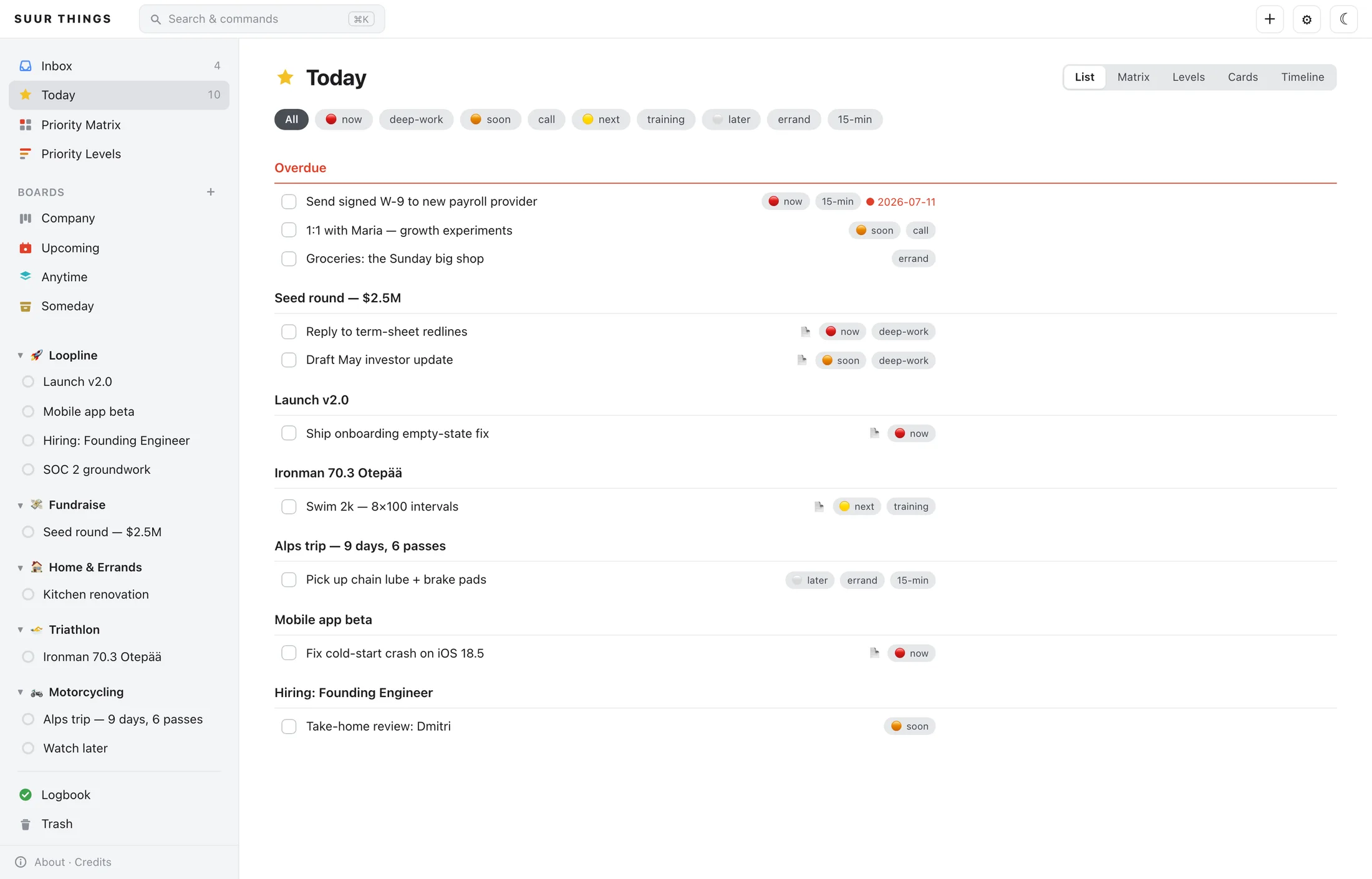
uvx suur-things-mcp dashboard runs a local board at 127.0.0.1. Faithful to the app you love, with the views you've been faking in spreadsheets.
Plan
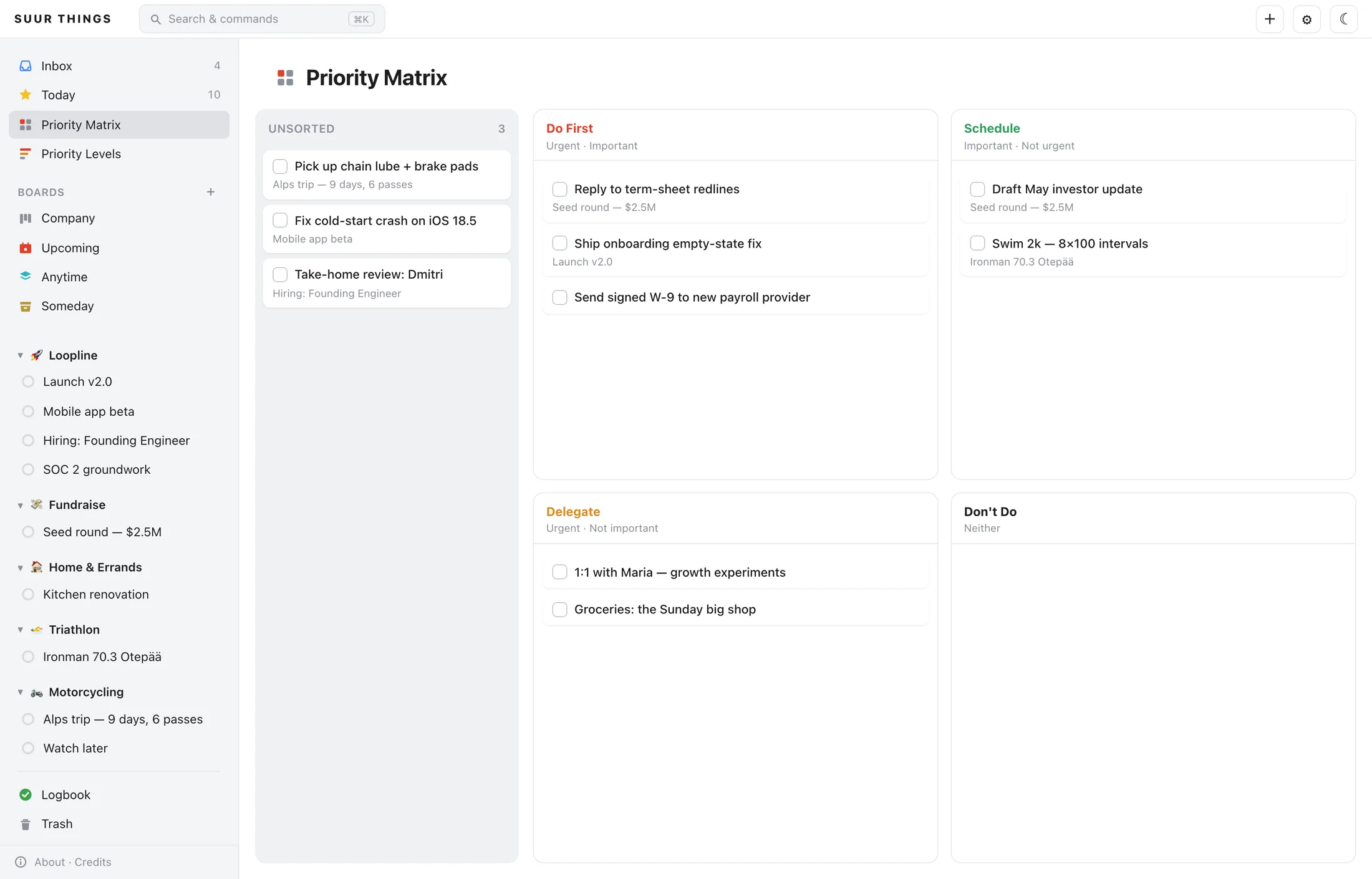
The Eisenhower matrix Things never had.
One click turns any list, project, or area into Do First / Schedule / Delegate / Don't Do. Drag tasks between quadrants. Your Things data stays untouched. The matrix is a local overlay.
Prioritize
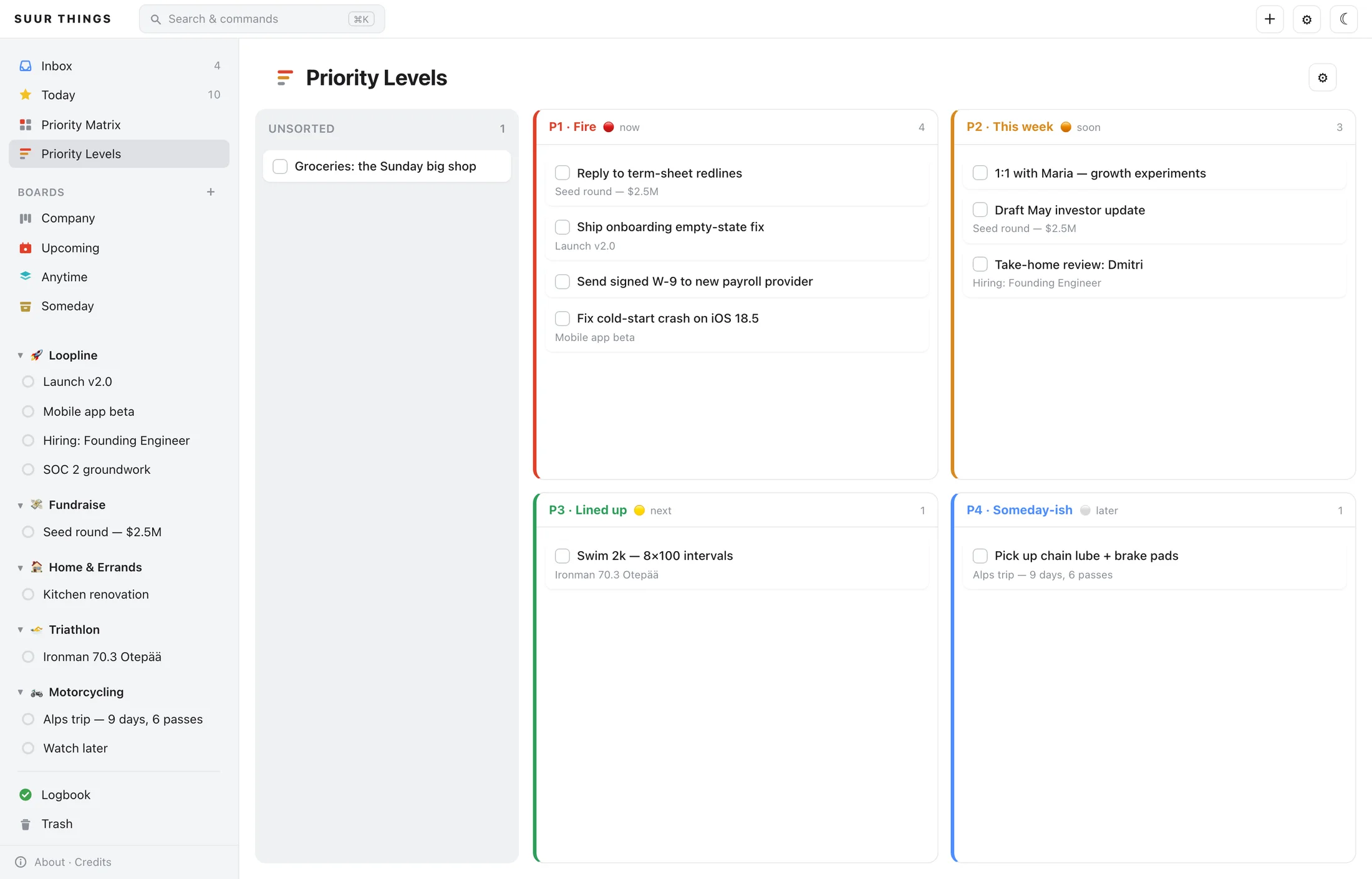
P1–P4, powered by your own tags.
Map a tag to each level (🔴 is P1, ⚪️ is someday-ish) and every list becomes a ranked 2×2. Drag a task to a new level and the tag is rewritten in Things itself, through the official URL Scheme. Fully bidirectional.
Time-block
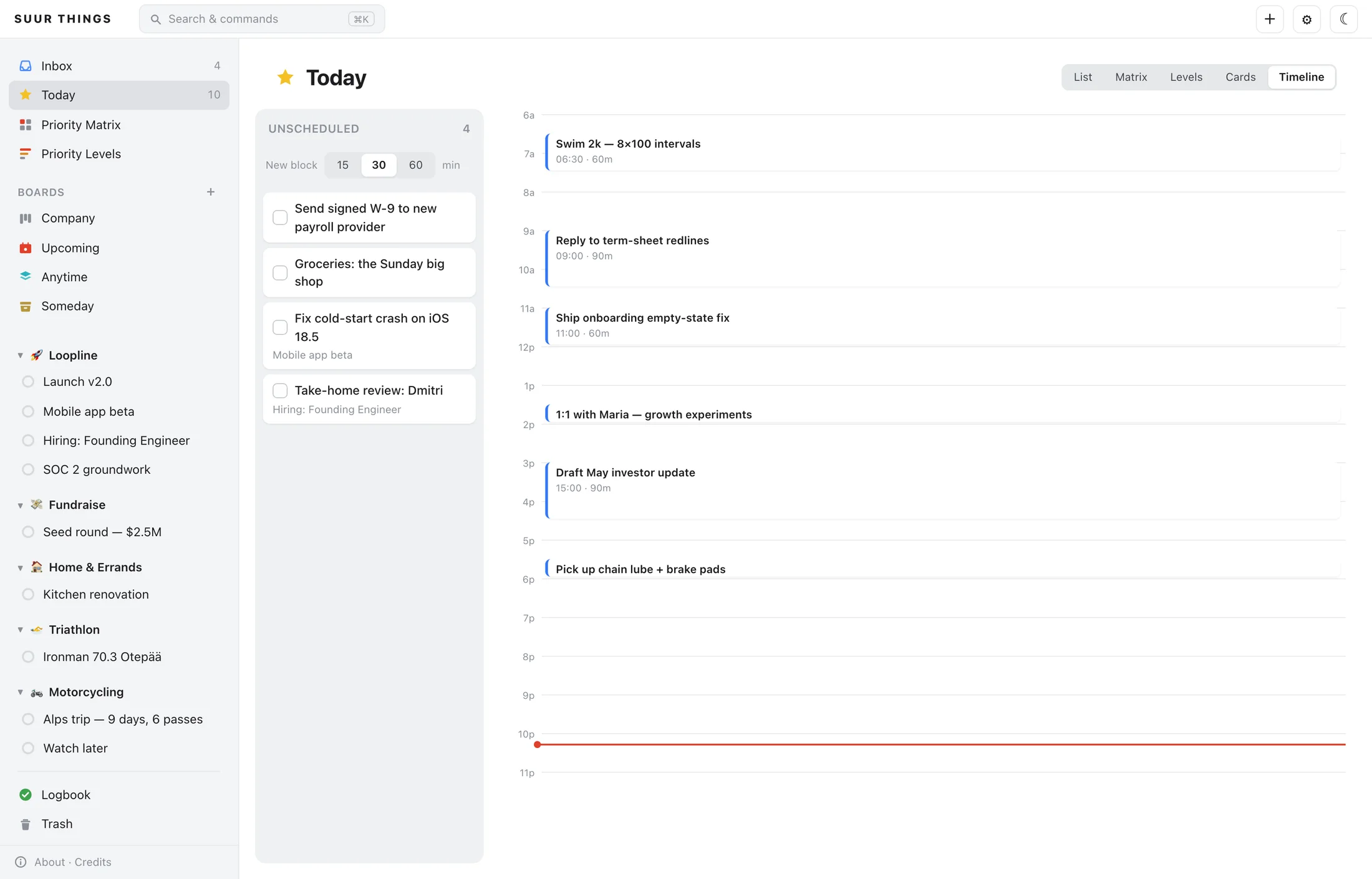
Drag today onto an actual day.
A 6am–11pm timeline for Today. Swim at 6:30, deep work at 9, the 1:1 at 13:30, drag tasks into 15/30/60-minute blocks and see where the day actually goes. Times live in a private overlay; Things never knows.
Zoom out
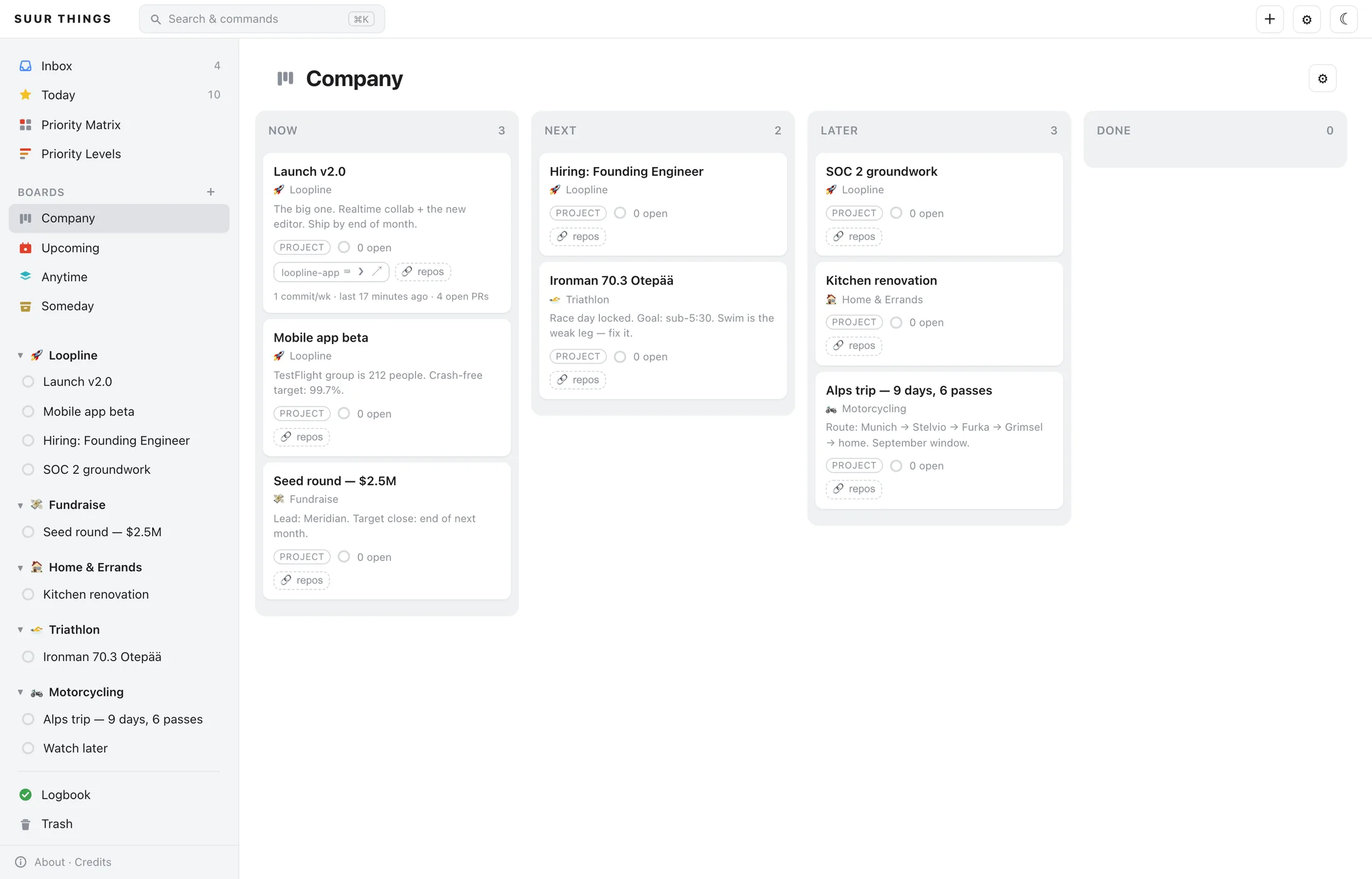
A portfolio board where cards are whole projects.
Now / Next / Later / Done across the company and your life, each card a project with a progress ring. Link a project to a local git repo and the card grows a pulse: commits this week, open PRs, one-click open in editor, terminal, or GitHub.
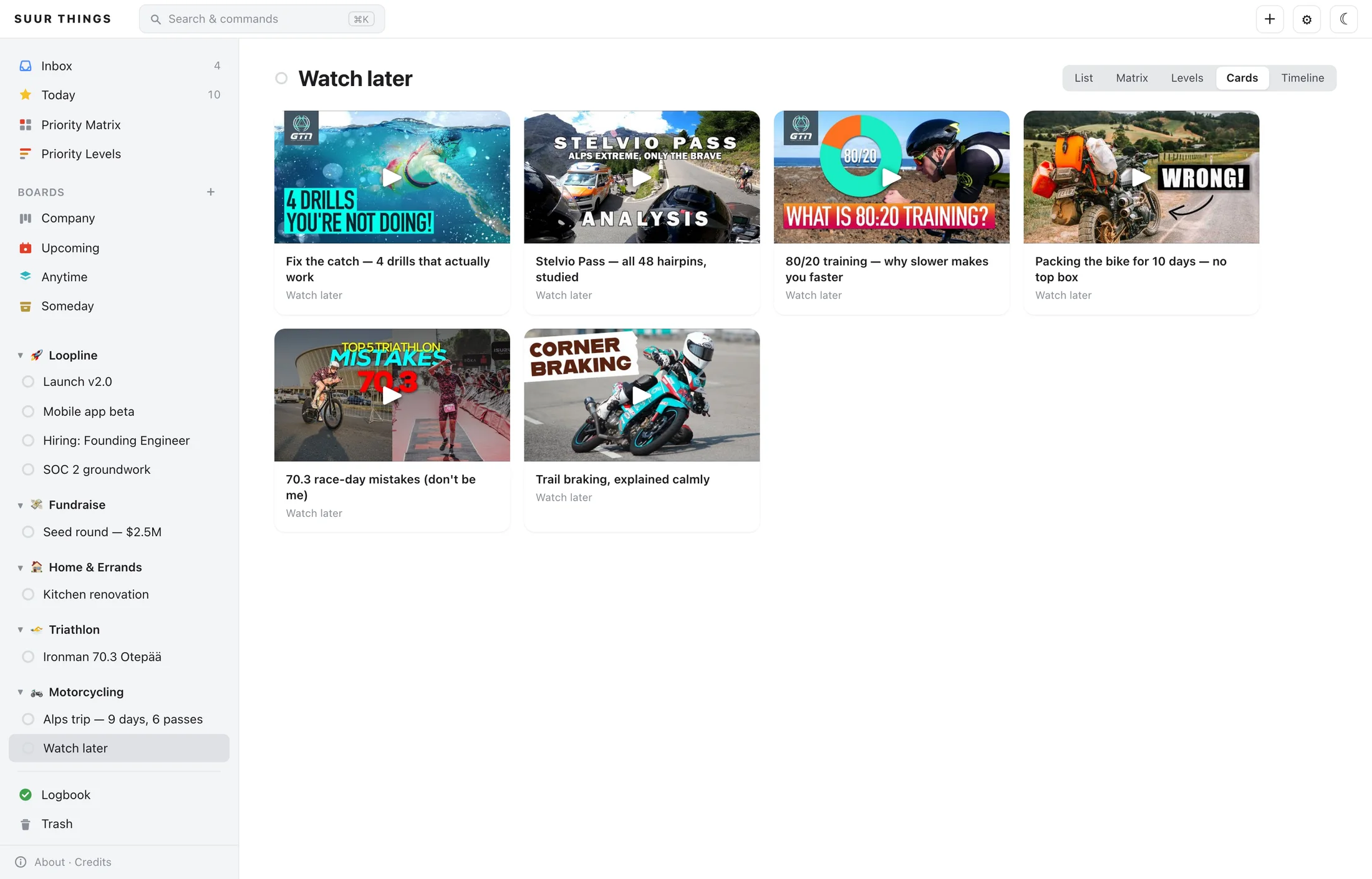
Watch later
A project full of links becomes a wall of thumbnails.
The Cards view turns any link-heavy project into a YouTube-thumbnail grid. Swim drills, Stelvio onboards, trail-braking theory, and suddenly your watch-later list looks like something you'd actually watch.
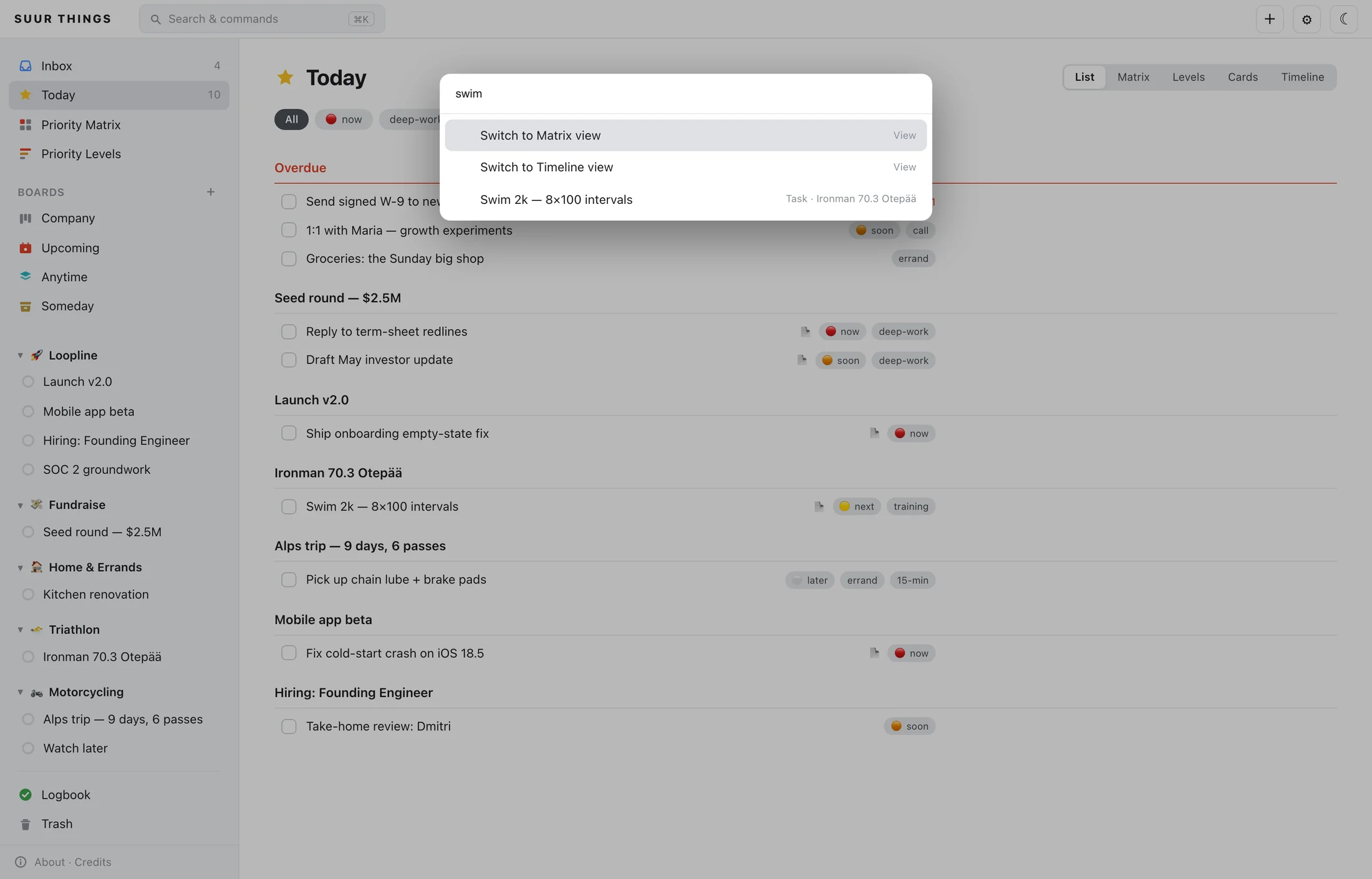
⌘K
Everything is four keystrokes away.
Jump to any list, project, or board. Search every task. Create, complete, reschedule, switch views, keyboard only. The command palette Things fans have been requesting since roughly the Obama administration.
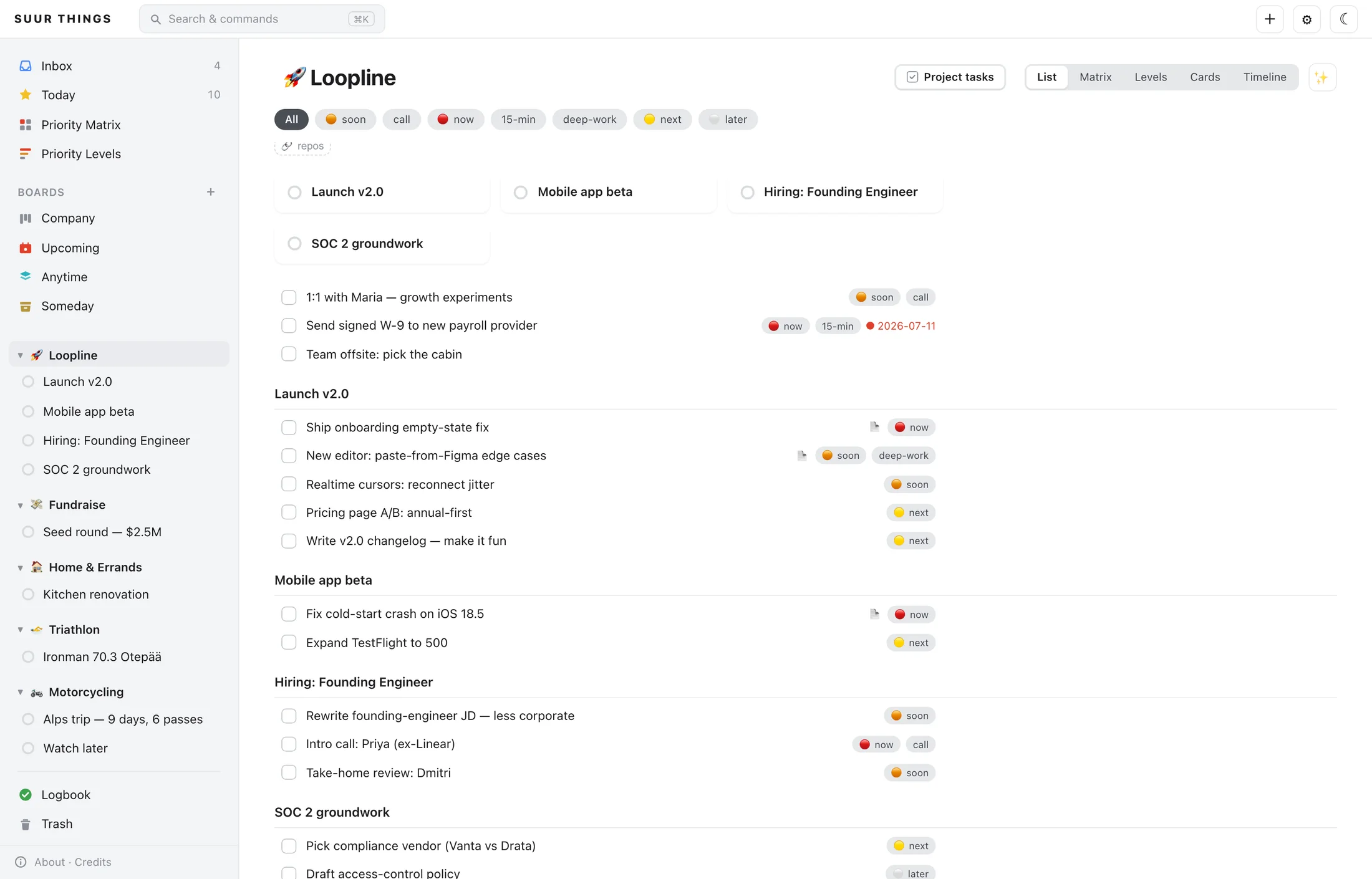
Roll-up
Open an area, see everything inside it.
Things shows an area as its loose to-dos. SUUR Things rolls in every project's open tasks, grouped by project: the true state of 🚀 your startup (or 🏍️ your garage) on one screen.
Obviously there's
a dark mode.
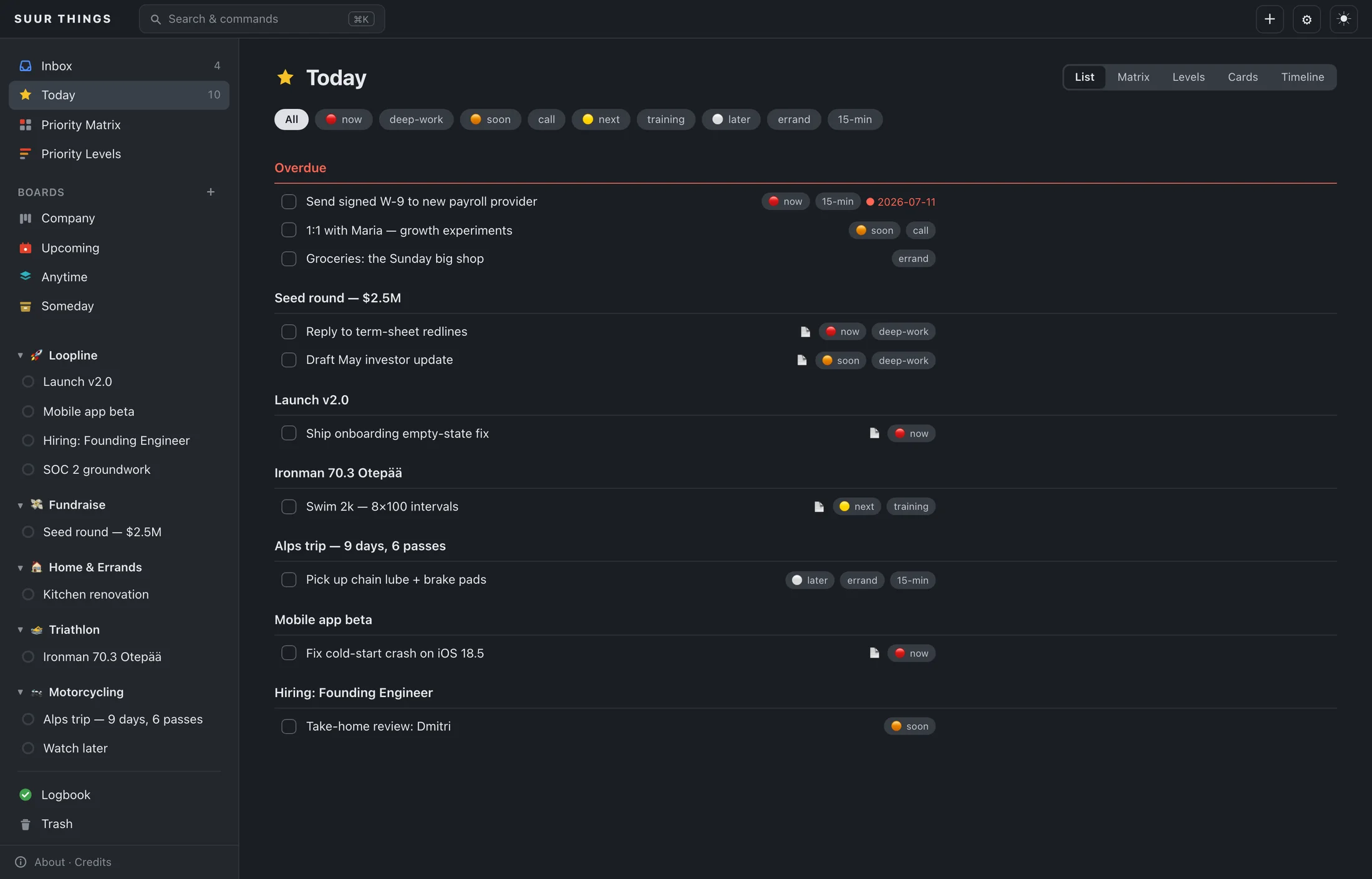
And the rest of the update.
Calm Today
One keystroke turns an overloaded Today into a single next action plus a short list. AI that subtracts.
Quick-add shorthand
buy milk tomorrow #errand, parsed into a real to-do, dates and all.
Full-text everything
Search across every list, note, and project. Tag chips filter any view.
Repo pulse
Cards show commits/week and open PRs for linked repos, via git + gh.
Checked-off lingering
Completed tasks stay visibly done until they log, exactly like the app.
Light & dark
Faithful Things look in both. Your OS decides, or you do.
31 MCP tools
Reads, writes, batch ops, and packaged prompts for real workflows.
MIT & local
No cloud, no account, no telemetry. 127.0.0.1 is the whole world.
Before you install
You need Things 3.
Actually installed. On a Mac.
This isn't a standalone to-do app. It's a companion that reads your existing Things 3 database and writes back through Things itself. No Things, no data, nothing to see.
✓Things 3 for Mac
The app from Cultured Code, with your tasks in it. Its local database is the single source of truth, and SUUR Things never replaces it.
✓macOS
Reads happen against the local Things database and writes go through the things:/// URL Scheme, both macOS-only by nature.
✓uv (or Python 3.10+)
uvx runs the server with zero setup. An auth token from Things' settings is only needed when an agent modifies existing tasks.
Questions, answered
The fine print,
minus the fine print.
No. SUUR Things is a companion for Things 3 by Cultured Code. It reads your existing Things database and writes back through the official Things URL Scheme. Without Things 3 installed on your Mac there is no data to read and nothing to write to. It is not a standalone to-do app.
It physically cannot corrupt the database. Reads open the Things SQLite database strictly read-only (mode=ro&immutable=1) and the database is never opened writable anywhere in the codebase. Writes go exclusively through the official things:/// URL Scheme, the same mechanism Cultured Code documents for Shortcuts and AppleScript. The worst an agent can do is what Things itself allows, and modifying existing tasks additionally requires an auth token you control.
Any MCP-capable client: Claude Code, Claude Desktop, Codex, and other Model Context Protocol clients. One command connects it: claude mcp add suurthings -- uvx suur-things-mcp. The local dashboard works standalone in any browser, no agent required.
SUUR Things itself sends nothing anywhere. No telemetry, no account, no cloud. The dashboard binds to 127.0.0.1 only. One honest caveat: if you connect an AI agent, that agent can read your to-do content and send it to whatever model it uses, so review your agent's privacy policy, not ours (we don't have one; there's nothing to collect).
macOS only. Reads come from the local Things database and writes go through the things:/// URL Scheme, both of which exist only on the Mac. Your changes sync to iPhone and iPad through Things Cloud as usual.
Same safe write mechanism, very different surface. SUUR Things exposes ~31 structured MCP tools an AI agent can actually reason with (lists, search, batch operations, packaged workflows like plan-to-project and inbox triage), plus a local web dashboard with the views Things doesn't have: Kanban boards, an Eisenhower matrix, priority levels from your tags, day time-blocking, a ⌘K command palette, and git repo links on projects.
Yes. Free and open source under the MIT license. No paid tier, no account, no trial. It's published on PyPI as suur-things-mcp and the full source is on GitHub.
Only for modifying existing tasks (rescheduling, completing, editing). Reading your lists and creating new to-dos work with no token at all. The token comes from Things' own settings (Things → Settings → General → Enable Things URLs) and never appears in URLs or error messages.
Stop waiting
for Things 4.
Two minutes from install to “what should I work on today?”
Works with Claude Code, Claude Desktop, Codex, and any MCP client · requires macOS + Things 3