What Webflow Is, and Who It Is For (2026)
Webflow is a visual website builder, a content management system and a web host sold as one product: you design in the browser, it writes the HTML and CSS, it stores your content, and it serves the site, for a monthly fee per site. That was the whole answer for a decade. In 2026 the company describes itself as an "AI-native platform," ships an AI assistant and an MCP server on the free plan, and has just introduced Source, which it calls a place "where modern teams and agents run the web." So the question in the title has two answers now: what Webflow does, and what Webflow is becoming. This explainer covers both, with every price read from webflow.com on 22 September 2026. We build on Webflow for clients and we also move clients off it, so the fit section is written from both sides of that fence, and the interest is disclosed where it matters.
The plain answer
Webflow is three things bolted together, and understanding it means separating them.
The Designer is the builder. It looks like a design tool, with a canvas, layers, a style panel, but what you are manipulating is real HTML and CSS: the box model, flexbox and grid, classes, breakpoints. That is the reason designers took to it and the reason it produces cleaner code than drag-and-drop builders that hide the web from you. It is also the reason it has a learning curve: if you do not know what a class or a container is, Webflow will teach you, whether you wanted the lesson or not.
The CMS is the content database. You define collections, say Blog Posts or Team Members, with fields, and the Designer binds layouts to them so one template renders every item. Non-technical people edit content in a simpler view without touching the design.
Hosting is where the money is. Webflow serves the site from its own infrastructure, with SSL, a CDN and forms handled for you, and charges per site per month for it. You can export the static HTML and CSS of a non-CMS site and host it elsewhere; you cannot export the CMS or the forms. That is the trade: convenience for lock-in, priced monthly.
What was added in 2026
The pricing page now opens with "Start building with Webflow's AI-native platform for free," and the free Starter plan lists three things that did not exist on it a year ago: Webflow AI, an MCP server, and Webflow Cloud app hosting. In plain terms: an assistant inside the tool, a way for outside AI agents to talk to your Webflow project, and a place to run small apps next to the site.
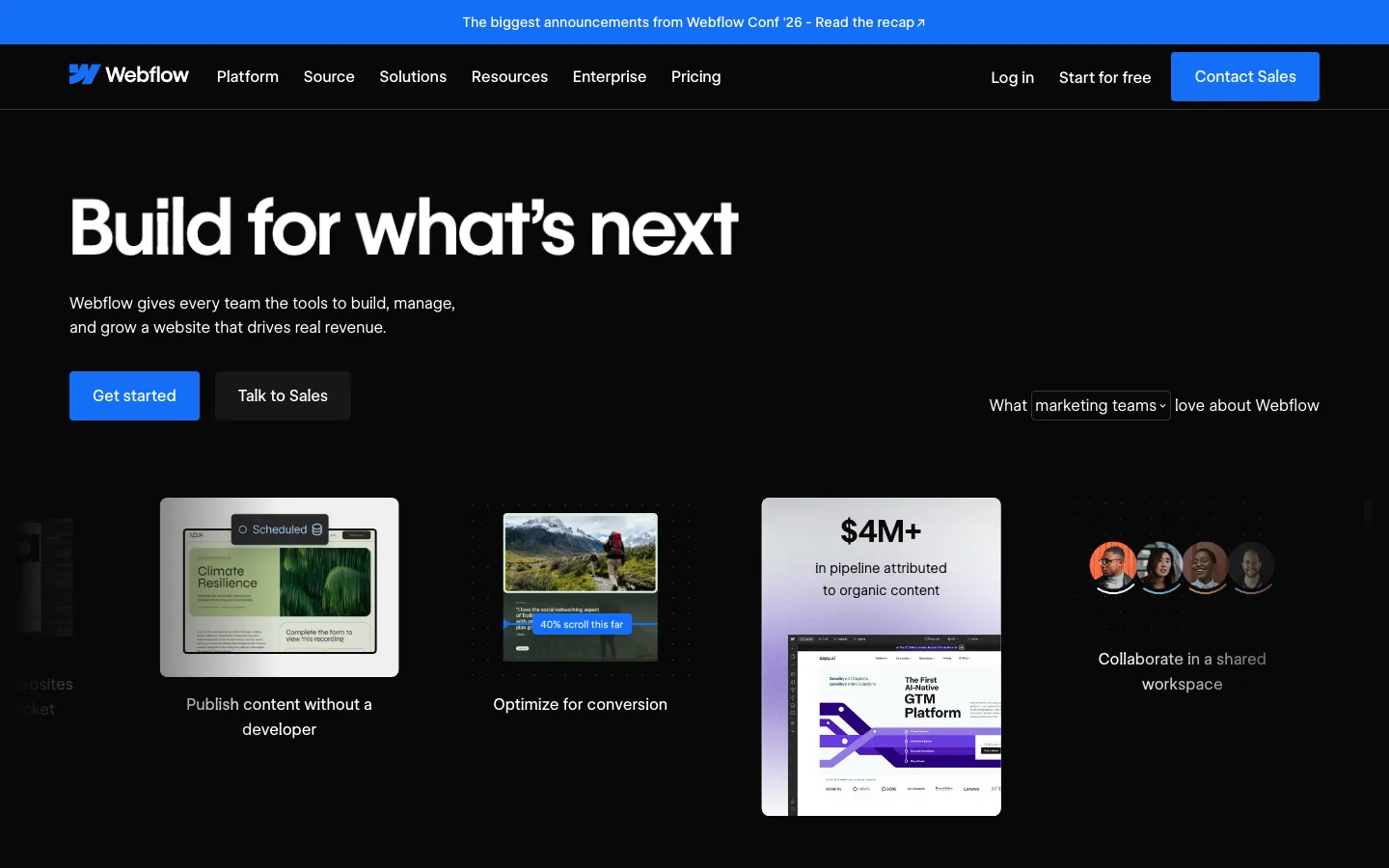
Above all of that sits Source. On the homepage on 22 September 2026, Webflow introduces it with four lines: connect any codebase and your existing stack; build agentically or visually; customize workspaces for every team member; orchestrate a team of always-on agents. The screenshot shows a workspace with an agent chat on one side and a rendered site on the other, working through a card-style rollout across pages. That is a different product from a visual builder, and Webflow is putting it above the fold. We are not going to describe what Source does beyond what the company's own page says, because the page is all that is public today; treat it as a direction, not a feature you can buy.
The add-ons are the other 2026 shape: Optimize for A/B testing and personalization, Analyze for analytics, Localize for translated sites, each priced separately and each pushing the total for a serious marketing site well past the headline plan.
What Webflow costs, read on 22 September 2026
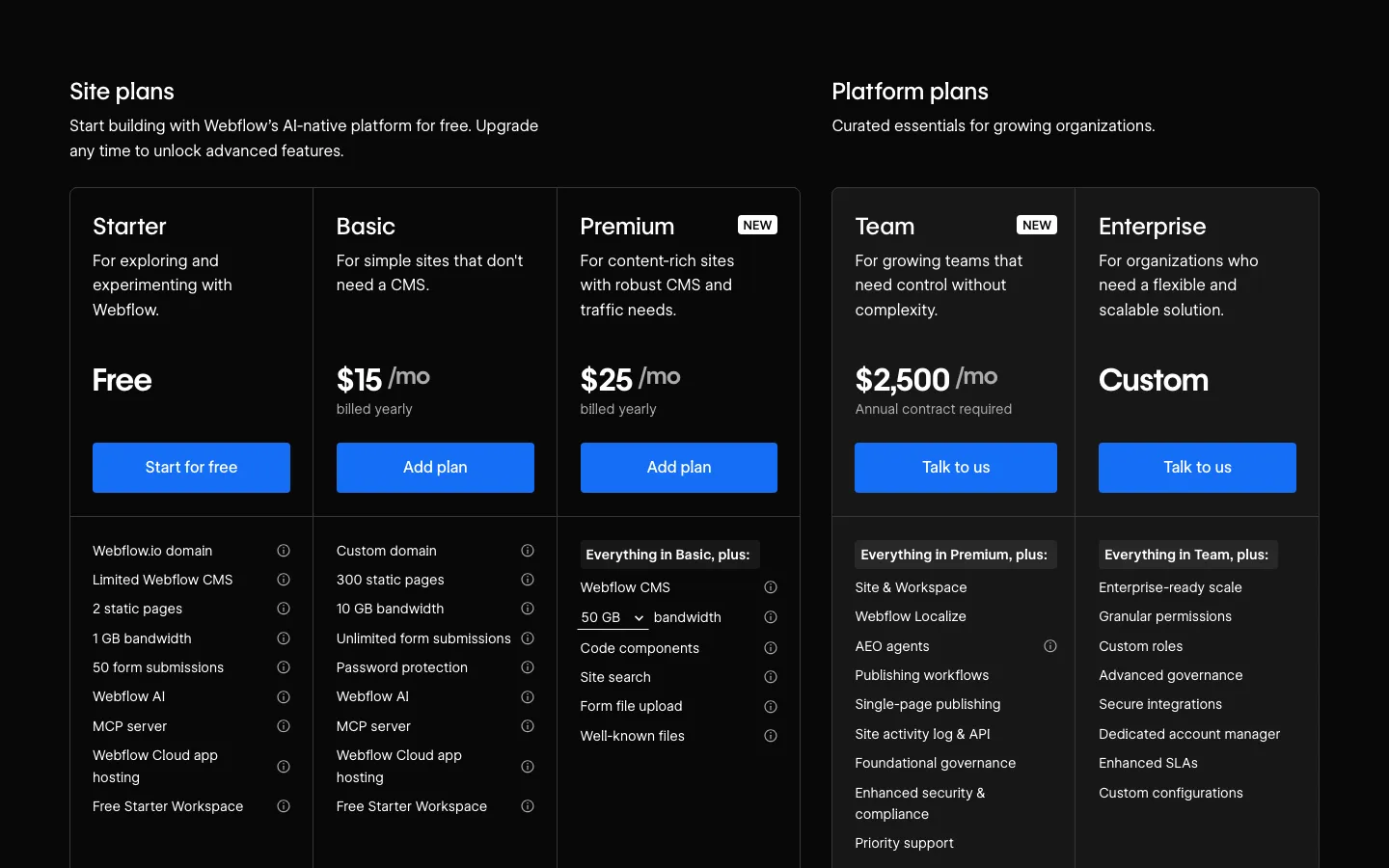
All prices in USD, per site, with the yearly-billing toggle on, as the page shows them by default.
| Plan | Price | What it is for |
|---|---|---|
| Starter | Free | Exploring. webflow.io domain, 2 static pages, 1 GB bandwidth, 50 form submissions, limited CMS. Includes Webflow AI, the MCP server and Cloud app hosting. |
| Basic | $15 a month, billed yearly | "Simple sites that don't need a CMS." Custom domain, 300 static pages, 10 GB bandwidth, unlimited forms, password protection. |
| Premium (new) | $25 a month, billed yearly | "Content-rich sites with robust CMS and traffic needs." Everything in Basic plus the CMS, 50 GB bandwidth, code components, site search, form file upload. |
| Team (new) | $2,500 a month, annual contract required | Platform plan. Everything in Premium plus site and workspace management, Localize, AEO agents, publishing workflows, single-page publishing, activity log and API, governance, priority support. |
| Enterprise | Custom | Everything in Team plus scale, granular permissions, custom roles, SLAs, a dedicated account manager. |
Add-ons for site plans: Optimize $299 a month based on page views (25,000 a month at the entry, up to five concurrent optimizations, A/B testing, personalization, AI Optimize). Analyze $9 a month based on sessions (2,000 a month at the entry). Localize Essential $9 a month per locale, Localize Advanced $29 a month per locale, and you can try Localize free until you publish.
Two things the table hides. First, the CMS starts at Premium now; a site with a blog is a $25 site, not a $15 one. Second, there is nothing between $25 and $2,500. The old middle tiers are gone, and the jump to Team is a hundred times the Premium price with a year's commitment attached. Our Webflow pricing explainer goes plan by plan on which one you actually need.
Who Webflow is for
Marketing teams that publish without a developer. This is the customer Webflow's own homepage speaks to: "publish content without a developer," "optimize for conversion," a workspace the whole team shares. A marketing site with a blog, landing pages and a few forms, edited weekly by people who are not engineers, is the case Webflow was built for and still the case it wins.
Designers and small agencies. Because the Designer is real CSS with a visual surface, a designer can build what they drew without handing it to a developer, and an agency can hand the finished site to a client who can then edit content safely. Webflow's pricing page has a Freelancers tab for exactly this. Our own Two Wheel Epix moved from WordPress to Webflow with zero rankings lost, and we sell that work as a Webflow agency.
Content-heavy sites that need structure. The CMS handles collections, references between them, and templated pages well, which is why directories, portfolios, editorial sites and multi-language marketing sites are common on it.
Who Webflow is not for
Anything that is an application. Login, user accounts, data that changes per user, payments beyond a simple checkout, dashboards, anything with logic. Webflow is a website tool. Cloud app hosting and the MCP server do not change that; they let you run something next to the site, not turn the site into software. If the product is an app, it needs code, and we would say that even if we did not build apps.
Teams that want to own the code without a monthly fee. You can export static pages, but the CMS, the forms and the hosting stay behind the subscription. If ownership matters, or if the per-site fees across many properties add up, a site in a framework you control costs more once and nothing per month. That is the case for our Website Migration, from Webflow, Framer, WordPress or Squarespace to code, with the rankings preserved.
Anyone who needs what sits between $25 and $2,500. Governance, roles, workflows, localization and single-page publishing are Team features now. A ten-person marketing team that needs approvals but not an enterprise contract is the customer the 2026 pricing left without a plan.
Very large or very fast-changing sites. Bandwidth and page counts are capped per plan, the CMS has item limits, and a site that is really a product catalogue or a publisher with tens of thousands of pages runs into the edges.
Webflow or code, honestly
The right question is not whether Webflow is good; it is. The question is where the monthly fee stops buying anything.
For a marketing site that changes weekly and is edited by non-developers, the fee buys a lot: hosting, forms, a CMS, an editor, and no deploy step. For a site that is finished, or a site that has become the company's product surface, the fee buys a platform the team has grown out of, and the code you cannot export is the cost of leaving. We build both. The Landing Page Sprint ships a page in real code in about three days, and the Webflow work we do goes through the same fit check: if the client's team will edit the site every week without a developer, Webflow; if the site is a product or the fee will outlive the site's usefulness, code.
For the comparison, Webflow alternatives covers Framer, Squarespace, Wix and WordPress against it, and the best Webflow agencies is for when you have decided on the platform and need someone to build it.
Have a product idea?
Designed, built, and shipped in about 5 days.