Webflow vs WordPress in 2026: An Honest Comparison
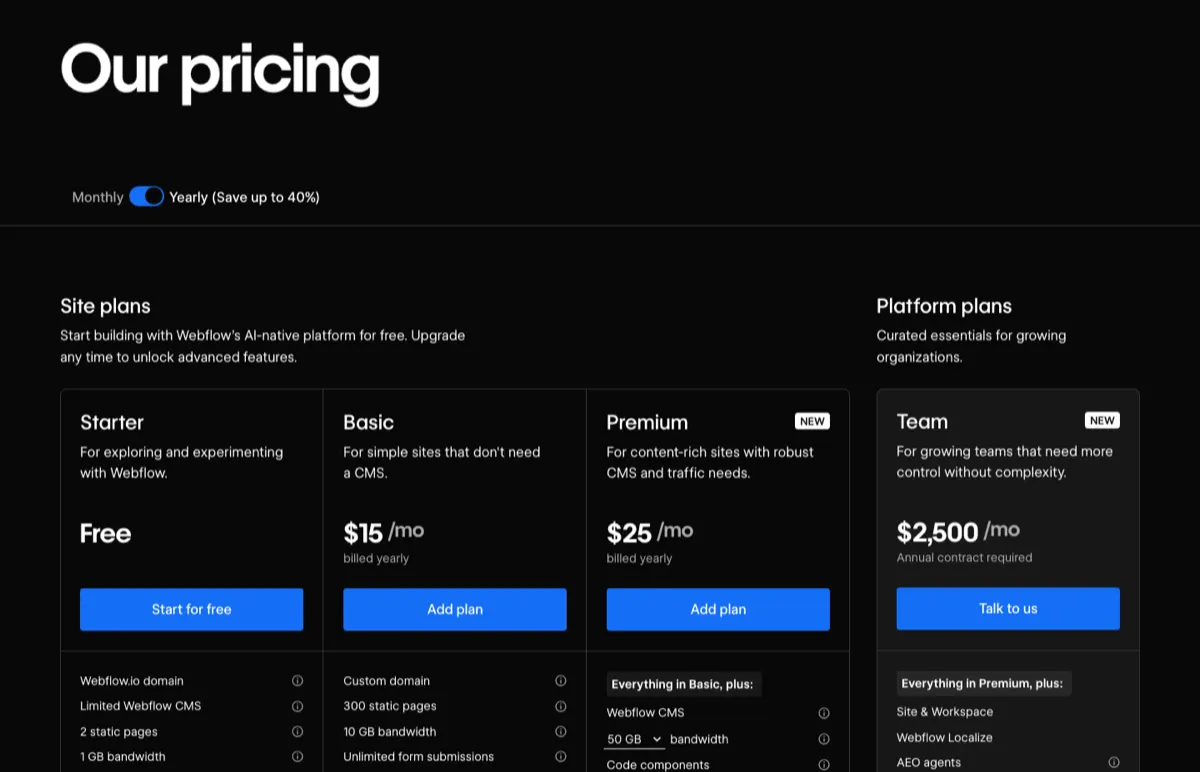
Consider Webflow for visual site building and managed hosting; consider WordPress when its publishing tools, plugins or hosting flexibility fit the brief. On 18 October 2026, Webflow Premium cost $25 a month billed yearly. WordPress.com Business advertised the same first-year price, renewing at $28, while its $4 Personal plan also supported plugins. Those plan prices do not include every operating cost. Compare editor permissions, integrations, maintenance responsibilities and the work required to leave. WordPress content export is not a complete site backup, and Webflow's static export does not transfer its hosted CMS and forms.
The short answer, by situation
| Your situation | Pick | Why |
|---|---|---|
| Marketing site, designers build it, marketers edit it | Webflow | Visual building, a CMS, hosting and updates in one subscription |
| Many editors with roles and approvals | Compare exact plans | Map each role and approval step to documented capabilities |
| You need a specific plugin, or WooCommerce | WordPress | Over 60,000 plugins on WordPress.com's own count; WooCommerce runs on 19.8% of WordPress sites, per W3Techs |
| Blog-first site on a small budget | WordPress.com | $4 a month billed yearly for the first year, plugins included |
| You may want to change hosts or vendors later | Consider WordPress | Open-source software supports hosting choice; plan a complete migration |
| The site needs application features | Evaluate the architecture | Check integrations, custom code, hosting and security requirements before choosing |
What each costs in year one
We read every price below on the vendor's own pricing page on 18 October 2026, in US dollars, for one site of about 20 pages with a blog.
| Option | Year one | After year one | What you get |
|---|---|---|---|
| Webflow Premium | $300 billed yearly, or $468 at $39 billed monthly | Same observed list price; recheck at renewal | Hosting, CMS up to 20,000 items, 50 GB bandwidth to start; platform managed by Webflow |
| Webflow Basic | $180 billed yearly, or $300 at $25 billed monthly | Same | Up to 300 static pages, no CMS |
| WordPress.com Personal | $48 at $4 a month | Renews at $5 a month | 6 GB storage, plugins, a domain free for the first year |
| WordPress.com Business | $300 at $25 a month | Renews at $28 a month | 50 GB, priority support, real-time backups, SFTP, WP-CLI and GitHub deployments |
| WordPress on WP Engine Essential | $336, billed annually | Same | Managed hosting from 25,000 visits a month, daily backups, WordPress and PHP updates |
| Plus Elementor and Yoast, if you use them | $60 for Elementor Essential, $118.80 for Yoast SEO Premium (ex VAT) | Same | Page builder for one site; SEO plugin with one seat |
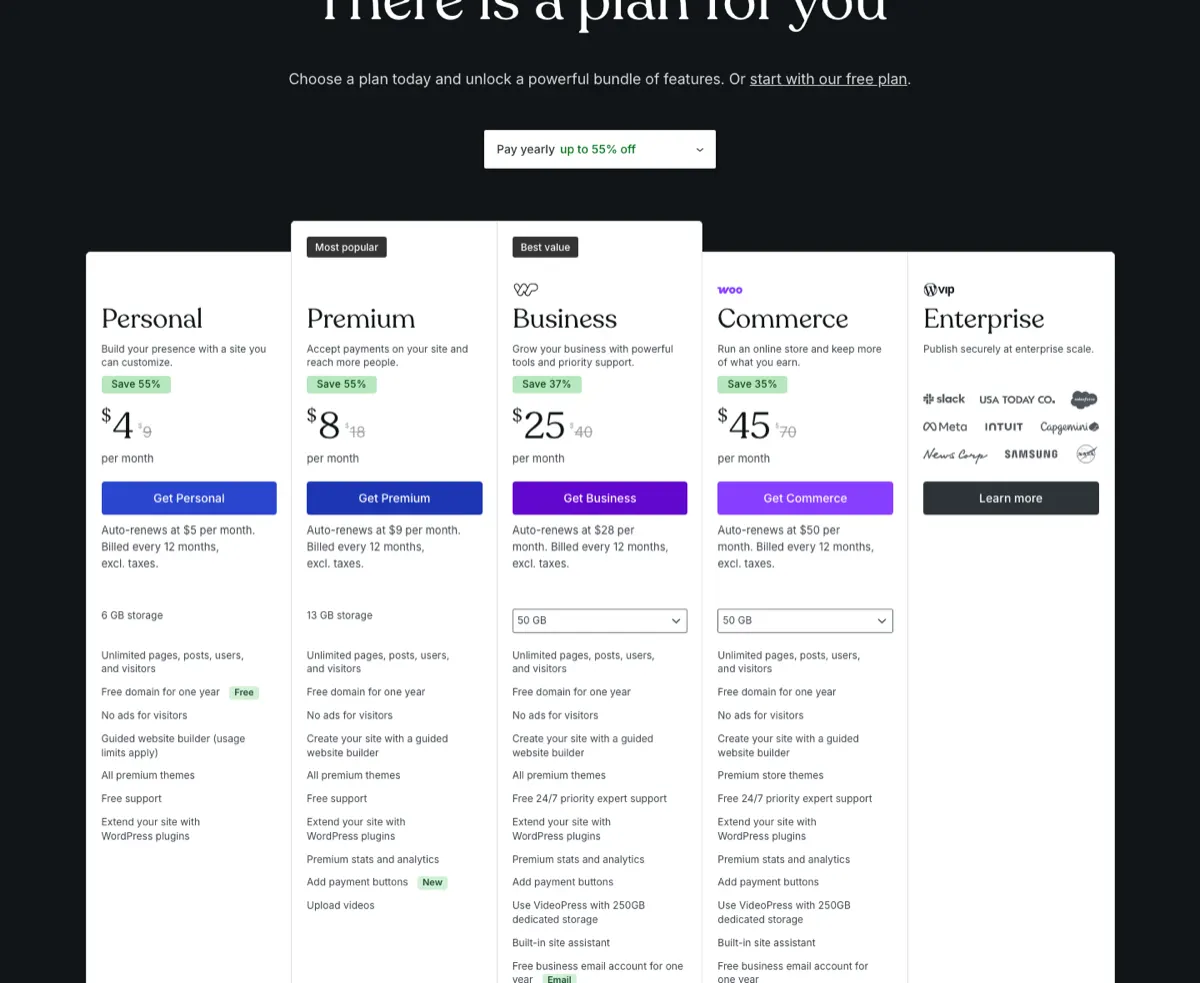
Three things in that table are easy to miss. WordPress.com prices are first-year prices, and the renewal is printed underneath in smaller type: Business goes from $25 to $28 a month. Webflow's monthly billing costs more than half again as much as yearly: Premium is $25 a month on a yearly plan and $39 on a monthly one. And the WordPress row most people mean is not bare WordPress. W3Techs counts Elementor, a page builder plugin, on 31.6% of WordPress sites, so the stack many teams compare against Webflow is WordPress plus a builder plus an SEO plugin.
Is Webflow cheaper than WordPress?
Not on the platform bill. WordPress.com's Personal plan is the cheapest way to run either, and Webflow's CMS plan costs the same as WordPress.com Business in year one. Self-hosted WordPress with a page builder and a premium SEO plugin comes to $514.80, against Webflow's $300.
The platform is also the small number. A 20-page site costs thousands to design and build on either, which we priced tier by tier in what website design costs, and the running cost is mostly people: who updates the content, who patches the software, who fixes it when a plugin update breaks a page. That last line is where the two differ most.
Who keeps the site running
On Webflow, the platform is Webflow's job. Its own FAQ says the hosting "uses Cloudflare's CDN" and "scales automatically to handle millions of simultaneous visits." There is no PHP version, database or plugin list for you to keep current.
On WordPress, it depends on where it runs. WP Engine's Essential plan includes "Automated WordPress & PHP updates," but lists "AI powered automatic plugin and theme updates" as an optional add-on on that plan, so plugin updates stay with you unless you pay for more. W3Techs' numbers show how often updates wait: on 18 October 2026, 66.4% of WordPress sites ran version 7, 26.7% version 6, and 6.9% version 5 or older. An older major version is not automatically unsafe, but a site two or three versions behind is usually one nobody is updating.
That is the trade to scope. WordPress maintenance depends on the host, plugins and support agreement. Webflow manages its platform, while your team still owns content, custom code, integrations, accessibility and regression testing.
Is Webflow better than WordPress for SEO?
Neither platform guarantees rankings. Content and links matter alongside crawlability, indexing, rendering, performance and implementation details. Webflow's plan comparison lists canonical tags, Open Graph settings and per-item indexing control. WordPress can provide additional controls through plugins. Test the rendered output and publishing workflow on either platform; a feature checklist does not establish that a site uses those features correctly.
Changing platforms adds migration risks beyond the platform choice. Our 2Wheel Epix project moved from WordPress to Webflow with a redesign and URL mapping. We do not provide a query-level before-and-after dataset here, so the case does not establish zero ranking loss. The practical checks are in our website migration guide.
Leaving each one
WordPress is open-source software, but distinguish content export from a complete migration. Tools → Export writes content to an XML file for import; it is not a portable copy of the theme, plugins, settings and all files. A full move needs a backup or migration process that covers those parts and tests their compatibility on the destination host.
Webflow lets you export, with conditions. Its pricing FAQ says you can host an exported site anywhere "with any of our paid Workspace plans," then adds: "Dynamic content must be exported on a collection-by-collection basis and forms will stop working." Its plan comparison table is blunter: code export gives you the HTML and CSS, and "Dynamic content (CMS items/pages) can't be exported." Asked about importing a site, it answers: "No, you can only develop websites in Webflow. If you export your code, it can't be reimported." The in-house Workspace plan that lists code export, Core, was $19 a month billed yearly. If owning the site matters to you, that answer settles it.
Can you move from WordPress to Webflow?
Yes, and it is a migration we have run ourselves. Map content to CMS collections, rebuild the layouts and redirect changed URLs to appropriate destinations. Keep unchanged URLs where practical. The balance of design, content and redirect work depends on the site. For a long blog, check current item, collection and bandwidth limits before choosing a plan.
For a move in the other direction, separately plan the CMS content, layouts, forms and integrations. The easier route depends on what the site actually uses.
Where we stand
We build on Webflow and in Next.js, the framework suur.io runs on, and we decline WordPress plugin stacks on our care plan, so weigh our view of WordPress with that in mind. For a marketing site that non-developers will edit, Webflow is usually our recommendation. Our Webflow agency work covers design, build and WordPress moves. If the site has outgrown a builder, Website Migration starts at $6,000, with URL mapping and monitoring included. Those checks reduce avoidable risk; they cannot guarantee rankings. For other options, read the WordPress alternatives comparison.
Price observations date to 18 October 2026. Primary plan pages: Webflow, WordPress.com, WP Engine and Elementor. Recheck introductory and renewal prices for the same billing commitment.
Two capability details deserve direct documentation. WordPress.com permits plugin installation on all paid plans; it is not a Business-only feature. Webflow has page branching and branch staging on specified Platform plans, with advanced publishing workflows governed by their own availability. Compare the exact permissions and release process your team needs.
Have a product idea?
Designed, built, and shipped in about 5 days.