Three.js vs WebGL: What It Means for Your Site
Three.js and WebGL are not alternatives: WebGL is the browser's interface to the graphics card, and Three.js is a library that makes WebGL pleasant to use, at a cost of about 87KB over the wire. The real question is which one your site needs, and that depends on what you are drawing. A 3D model with lights and a camera wants Three.js. A full-screen shader background, the flowing colour behind our own hero sections, does not, and we ship eight of those written straight against WebGL with no library at all. What surprised us, measuring this on 21 September 2026, was where the cost actually sits. It is not the library and it is not the shader. On a machine without a usable GPU, simply asking the browser for a WebGL context blocked the main thread for two and a half seconds, and the one flag the spec offers to prevent that did nothing. Below: the difference, the numbers, and the fix we shipped today.

The plain answer
WebGL is an API built into every modern browser. It hands you a drawing surface, a <canvas>, and a way to run small programs called shaders on the graphics card. It is low level: you write the vertex data, compile the shader source, bind the buffers, set the uniforms, and draw triangles. A working WebGL background is a few hundred lines, and every one of them is yours to maintain.
Three.js is a JavaScript library that sits on top of WebGL and gives you the vocabulary of a 3D scene: a scene graph, cameras, lights, materials, geometry, model loaders for glTF and friends, post-processing, animation mixers, and a renderer that turns all of that into WebGL calls. It is the standard choice for anything with actual three-dimensional objects, and it now also targets WebGPU, the API that will eventually replace WebGL.
So the comparison is between using the raw API and using the library. Same graphics card, same shaders underneath. The difference is how much you write, how much you download, and what happens when the graphics card is not there.
What Three.js adds, and what it weighs
Version 0.184.0, read from our own node_modules on 21 September 2026: the minified ES module build is 364,998 bytes, which gzips to 86,685 bytes. Call it 87KB on the wire before you have drawn anything, and that is with tree-shaking on a modern bundler doing its best.
For that you get everything the library knows how to do: a perspective camera that behaves like a real lens, physically based materials that react to light, a loader that turns a designer's glTF export into something on screen, shadows, environment maps, and a renderer that handles the hundred details of WebGL state you would otherwise handle yourself. If your page has a product model, a spinning object, a scene you can orbit, or anything that needs lighting, this is money well spent. Writing a glTF loader and a PBR material system by hand is a project, not a task.
Now the other side. Our site runs WebGL on the homepage, on the MVP in 5 Days page, on every offer page and on the design subscriptions page. Eight separate effects exist in the codebase. Not one of them imports Three.js. The one behind the MVP page, a domain-warped noise gradient with grain and a vignette, is 6,867 bytes of source and compresses to 3,052 bytes. The whole effect, shader included, is smaller than the library's license header would be after a few more releases.
That is not an argument against Three.js. It is an argument for asking what you are drawing. A full-screen fragment shader has no camera, no lights and no geometry beyond one triangle that covers the screen. The library has nothing to offer it except weight.
For honesty: three is still listed in our package.json. It came in with a 3D glass version of our logo that we built, shipped, and then removed from the homepage, and the component is parked in the repo for a future page. It ships in no bundle today. We checked the built output rather than trusting the dependency list.
The cost nobody measures
Here is the part that changed how we think about this, and it applies to Three.js and raw WebGL alike.
Every WebGL effect starts the same way: canvas.getContext("webgl"). On a laptop or phone with a working GPU, that call returns in a few milliseconds. On a machine where the browser cannot or will not use the GPU, an old integrated chip on a blocklist, a virtual machine, a locked-down corporate laptop, or the machine running your Lighthouse audit, the browser does something expensive instead: it boots a software rasterizer, a program that pretends to be a graphics card, on the CPU. Chrome's is called SwiftShader.
We measured what that costs on our own pages, in headless Chrome with the CPU throttled four times and WebGL forced onto SwiftShader, which is the worst case and also roughly what lab tools see. Three warm runs each, medians:
- On the MVP page, the
getContextcall alone took 2,531ms. Not the shader compile. Not the first frame. The call that asks for the context. - Total long-task time on the page, meaning main-thread blocks over 50ms that stop the page responding: 3,445ms, with the longest single task at 2,926ms.
- The same page with the WebGL effect absent, for comparison: about 240ms of long tasks in total.
Our components already detected software rendering and dropped to a single static frame, which is the standard advice and which we had followed. It did not help, because the detection runs after the context exists, and the context is the expensive part. You cannot ask the browser which renderer it would use without asking it to create one.
There is a flag in the specification for exactly this situation: failIfMajorPerformanceCaveat: true, which is supposed to make getContext return null instead of a software-rendered context. We tested it. Chrome returned a SwiftShader context anyway, and the call took 2,181ms. The documented escape hatch does not fire.
The fix, and what it measured
If the cost cannot be avoided and cannot be detected in advance, the only lever left is when it lands. The change we shipped today is small: the context is no longer requested while the page is loading. It is requested from requestIdleCallback, after the page has painted and hydrated, with a two-second ceiling so it still arrives. On a real GPU the callback fires within milliseconds and nothing visible changes. On a software renderer the same cost is paid later, off the critical path, after the page is already usable.
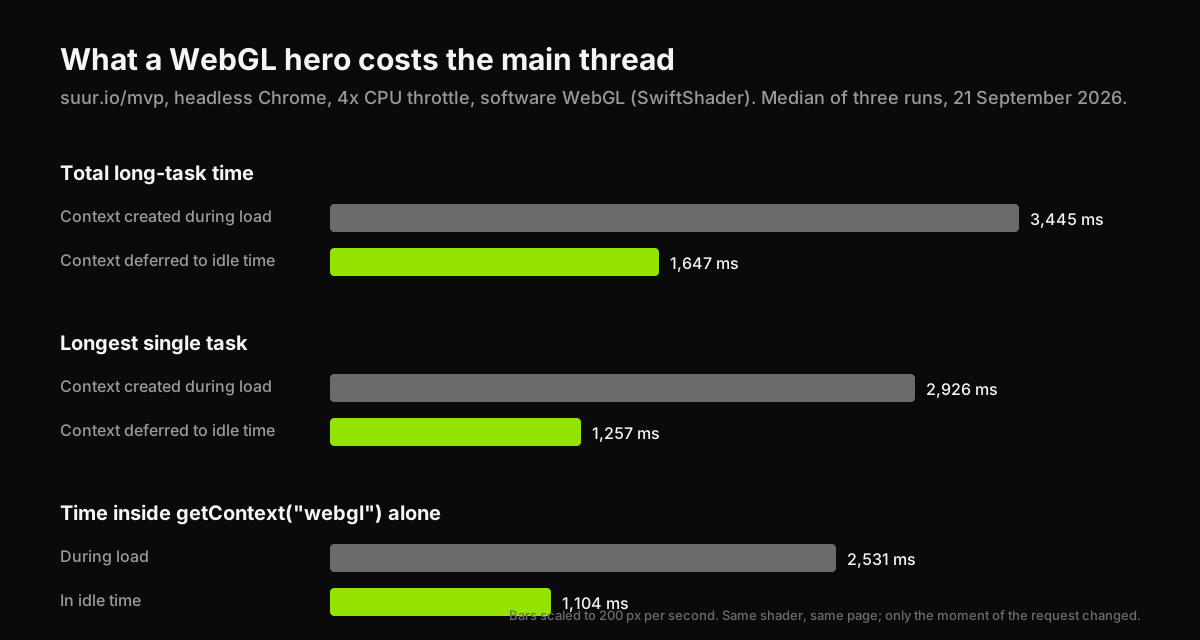
Same shader, same page, same throttled software renderer, three warm runs each, medians:
| Context during load | Context in idle time | |
|---|---|---|
| Total long-task time | 3,445ms | 1,647ms |
| Longest single task | 2,926ms | 1,257ms |
Time inside getContext | 2,531ms | 1,104ms |
The remaining second is the software renderer doing its job, and it now happens when nothing else is competing for the thread. The context call itself got cheaper too, from 2.5 seconds to 1.1, because it stopped fighting hydration for the CPU.
Two caveats we would want stated if someone else published this. These are lab numbers from a deliberately hostile configuration, not field data from real visitors; on a phone with a GPU the effect costs almost nothing either way. And the first run against a freshly deployed page came back at 9 seconds and was discarded as a cold cache, which is why the table says warm runs.
When to use which
Use Three.js when:
- There is a 3D object: a product, a logo, a scene, anything a designer exported as a model.
- You need a camera, lights, shadows, reflections or materials that respond to light.
- You want to load standard formats, glTF above all.
- The interaction is spatial: orbit, zoom, drag an object.
- You may want WebGPU later without rewriting.
Write WebGL directly when:
- The effect is a full-screen shader: gradients, noise, grain, ripples, glass, halftone.
- There is one flat surface and no camera.
- The whole point is a background that must cost almost nothing to download.
- You are comfortable owning a few hundred lines of shader and setup code.
Use neither when:
- CSS can do it. A gradient that moves, a blur, a subtle animation: CSS runs on the compositor, costs no JavaScript, and never boots a software renderer.
- The page has to be fast on hardware you do not control. Marketing sites are viewed on whatever the visitor has.
Whichever you choose: create the context after load, not during it. Stop rendering when the canvas leaves the viewport. Cap the pixel ratio; we use 1.5. Render one static frame on software renderers and when the visitor asks for reduced motion. Release the context on unmount. All five of those are in our components, and until today four of them were.
What this means for a marketing site
A hero that moves is one of the few things a visitor cannot get from a template, and done well it earns its place. Done carelessly it is the slowest thing on the page, on exactly the machines where the page needed to be fast. The library is rarely the problem; the moment you ask for the graphics card is.
We sell this as an add-on. The 3D / WebGL Brand Experience is $12,000 flat, on top of a Landing Page Sprint at $3,500 or a Product Sprint at $9,000, and takes about two weeks on top of the base build. It ships with the deferral, the viewport pause, the pixel-ratio cap and the reduced-motion frame described above, because we measured what happens without them on our own site first.
Have a product idea?
Designed, built, and shipped in about 5 days.