Website Audit Tools
Best Website Audit Tools in 2026: Free and Paid
Choose website audit tools by job, with current free and paid limits, actual Lighthouse and WAVE reports, and a workflow for verifying findings.
| Tool | Access and price | Scope | Best use |
|---|---|---|---|
| PageSpeed Insights / Lighthouse | Free web interface; free, open-source Lighthouse | Page diagnostics; PSI includes field data when available | Investigating loading performance and automated page checks |
| Screaming Frog SEO Spider | Free: 500 URLs per crawl; paid: US$279/user/year | Desktop technical crawl; free features restricted | Inspecting site structure and technical issues across URLs |
| Ahrefs Site Audit | Free: 5,000 credits/verified project/month; Starter US$29/month; Lite US$129/month | Cloud audits; project and crawl limits vary by plan | Recurring technical review, including verified sites on the free plan |
| WAVE | Free online tool and browser extensions; paid API separate | Accessibility indicators on a page; human review required | Locating potential barriers and inspecting their page context |
| Microsoft Clarity | Free; installation and visitor activity required | Heatmaps and session replays, not a paste-URL audit | Investigating how visitors interact with a live site |
- Access and price
- Free web interface; free, open-source Lighthouse
- Scope
- Page diagnostics; PSI includes field data when available
- Best use
- Investigating loading performance and automated page checks
- Access and price
- Free: 500 URLs per crawl; paid: US$279/user/year
- Scope
- Desktop technical crawl; free features restricted
- Best use
- Inspecting site structure and technical issues across URLs
- Access and price
- Free: 5,000 credits/verified project/month; Starter US$29/month; Lite US$129/month
- Scope
- Cloud audits; project and crawl limits vary by plan
- Best use
- Recurring technical review, including verified sites on the free plan
- Access and price
- Free online tool and browser extensions; paid API separate
- Scope
- Accessibility indicators on a page; human review required
- Best use
- Locating potential barriers and inspecting their page context
- Access and price
- Free; installation and visitor activity required
- Scope
- Heatmaps and session replays, not a paste-URL audit
- Best use
- Investigating how visitors interact with a live site
The best website audit tool depends on the question: is the page slow, is the site technically crawlable, can people use it, or where do visitors struggle? A crawler, an accessibility checker and a session replay tool provide different evidence. Buying one doesn't replace the other kinds of review.
The five selections above cover those jobs. We compared their purpose, access requirements, useful free limits and the work needed to interpret results. Only Lighthouse and WAVE were run for this article, against our published landing page versus website guide. The other assessments use official documentation checked on October 21, 2026.
Key Takeaways
- Choose by audit task before comparing prices.
- A high automated score can coexist with findings that deserve investigation.
- Compare free crawl limits by their units; behavior tools also need installation and visitor activity.
- Preserve the evidence, reproduce the issue and retest the affected task after a fix.
Disclosure: SUUR publishes this comparison and sells website services. Our own tools are discussed separately below, outside the five-tool comparison.
PageSpeed Insights and Lighthouse: page-performance investigation
Start here when you need to investigate loading behavior on a particular page. Lighthouse is a free, open-source automated auditor available through workflows including Chrome DevTools and the command line. PageSpeed Insights provides a free web interface for page analysis.
Keep lab and field measurements separate. Google's PageSpeed Insights documentation explains that its Chrome User Experience Report data covers a trailing 28-day period. When URL-level data is insufficient, PSI may show origin-level data; field data can also be unavailable. Check which scope the interface actually displays.
Our run was Lighthouse CLI, not a PSI field-data assessment. On October 21 at 13:30:55 UTC, Lighthouse 13.5.0 audited the article using Headless Chrome 155 on macOS, mobile emulation at 412 × 823, and simulated throttling: 150 ms round-trip latency, 1,638.4 Kbps throughput and 4× CPU slowdown. This was one run on one URL.
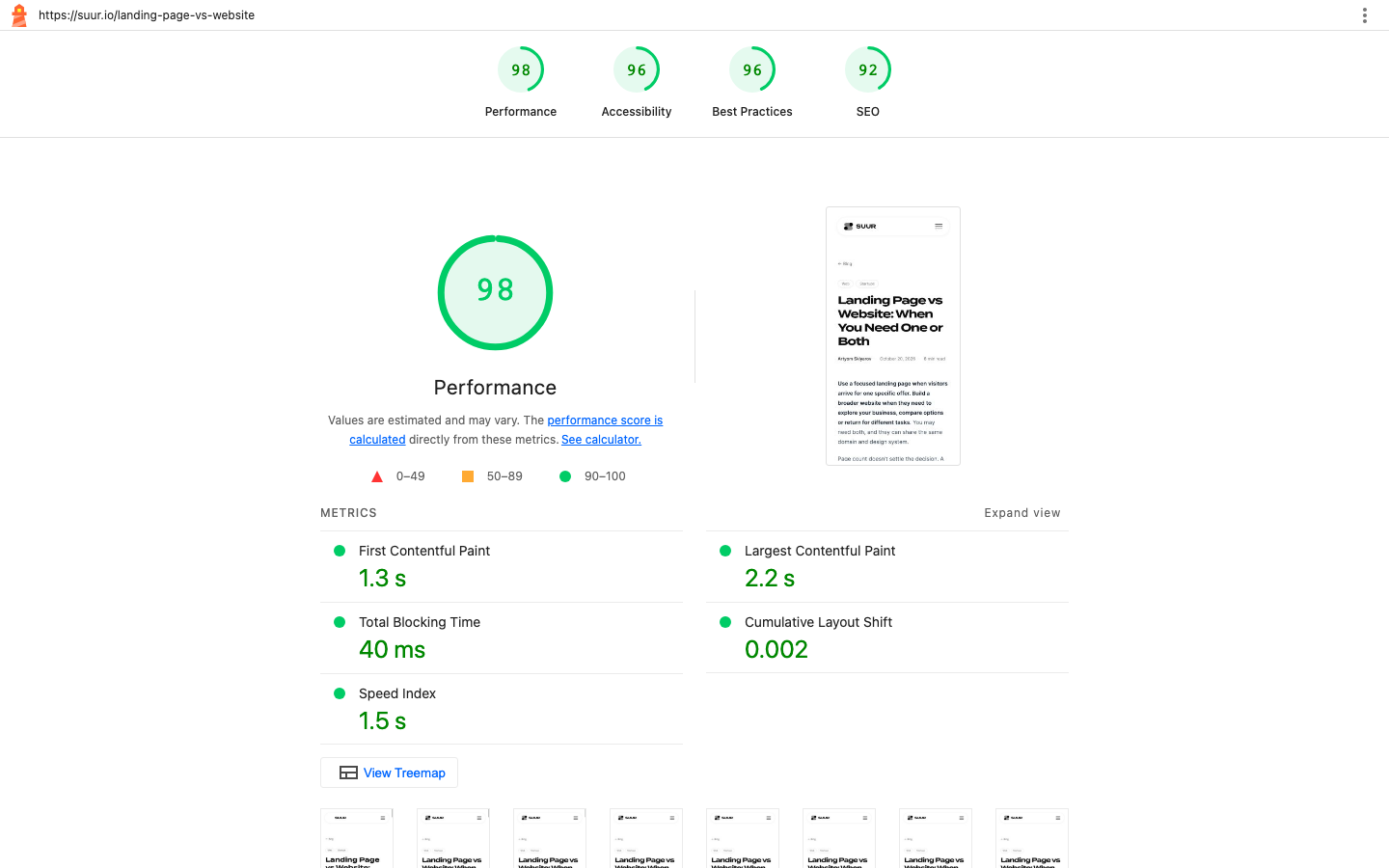
The category scores were 98 for performance, 96 for accessibility, 96 for best practices and 92 for SEO. The report displayed Largest Contentful Paint of 2.2 seconds, Total Blocking Time of 40 milliseconds and Cumulative Layout Shift of 0.002. The public evidence extract retains the settings, scores, metrics and failed checks, with the original report's hash.
Those green scores didn't mean the page had no issues. The report flagged contrast, generic link text and a browser-console error. Its empty run-warnings list did not clear those failed audits. Use the detailed findings to decide what to reproduce; don't interpret a 98 performance score as proof that every visitor has a fast experience.
Screaming Frog SEO Spider: a desktop technical crawl
Choose Screaming Frog when your question spans URLs rather than one page. Its documented capabilities include inspecting broken links, redirects, page titles and meta robots directives. That makes it useful for questions such as which old URLs redirect incorrectly or which pages carry indexing restrictions.
The free SEO Spider crawls up to 500 URLs per crawl without signup. Its configuration, saved crawls, JavaScript rendering, extraction and API integrations are restricted. The official USD price, checked October 21, is US$279 per user per year. The paid licence removes the software's 500-URL cap, but available memory and storage still constrain capacity.
We did not run this crawler for the comparison. Before paying, define a representative crawl: which sections matter, whether JavaScript rendering is needed and which findings you need to retain. The free URL allowance alone doesn't establish whether the free edition fits that workflow.
For a small site, start by checking whether the free edition covers the relevant URLs and required features. For a larger or more complex review, evaluate the paid configuration against that scope. A completed crawl still needs interpretation; it doesn't demonstrate that customers can successfully finish a task.
Ahrefs Site Audit: recurring cloud audits
Consider Ahrefs when you want recurring technical review in a hosted workflow, particularly for a site you can verify. This section is based on documentation, not a signed-in trial.
Ahrefs Free allows unlimited verified sites with 5,000 crawl credits per project per month. Account access and ownership verification are required. Credits apply to HTML pages returning a 200 status, so they are not a count of every resource requested.
The Lite plan was US$129 per month on October 21, with 100,000 crawl credits and five unverified projects. It is not the cheapest paid option: Starter costs US$29 per month, with one unverified project, a 500-page limit per unverified project and 10,000 monthly credits. Its verified-project allowance remains 5,000.
The practical buying question is whether you need more coverage of your own verified site, access to an unverified project, or other paid capabilities. Don't assume a paid entry plan lifts every free-plan limit. Write down the number of projects, pages and intended crawl frequency before comparing allowances. If the free plan covers the required review, there is no reason to upgrade just to obtain a paid dashboard.
WAVE: accessibility findings in page context
Use WAVE when you want to inspect potential accessibility barriers alongside the affected content. Its online tool and browser extensions are free; API and sitewide arrangements are separate products. The extension is useful when you need to evaluate a rendered dynamic, local or private page.
We opened the online report for the same article on October 21. It displayed 1 error, 26 contrast errors and 11 alerts, including one missing-alternative-text flag. These are observed WAVE output counts, not 38 independently confirmed defects. The saved observation transcript preserves the reported categories and detail.
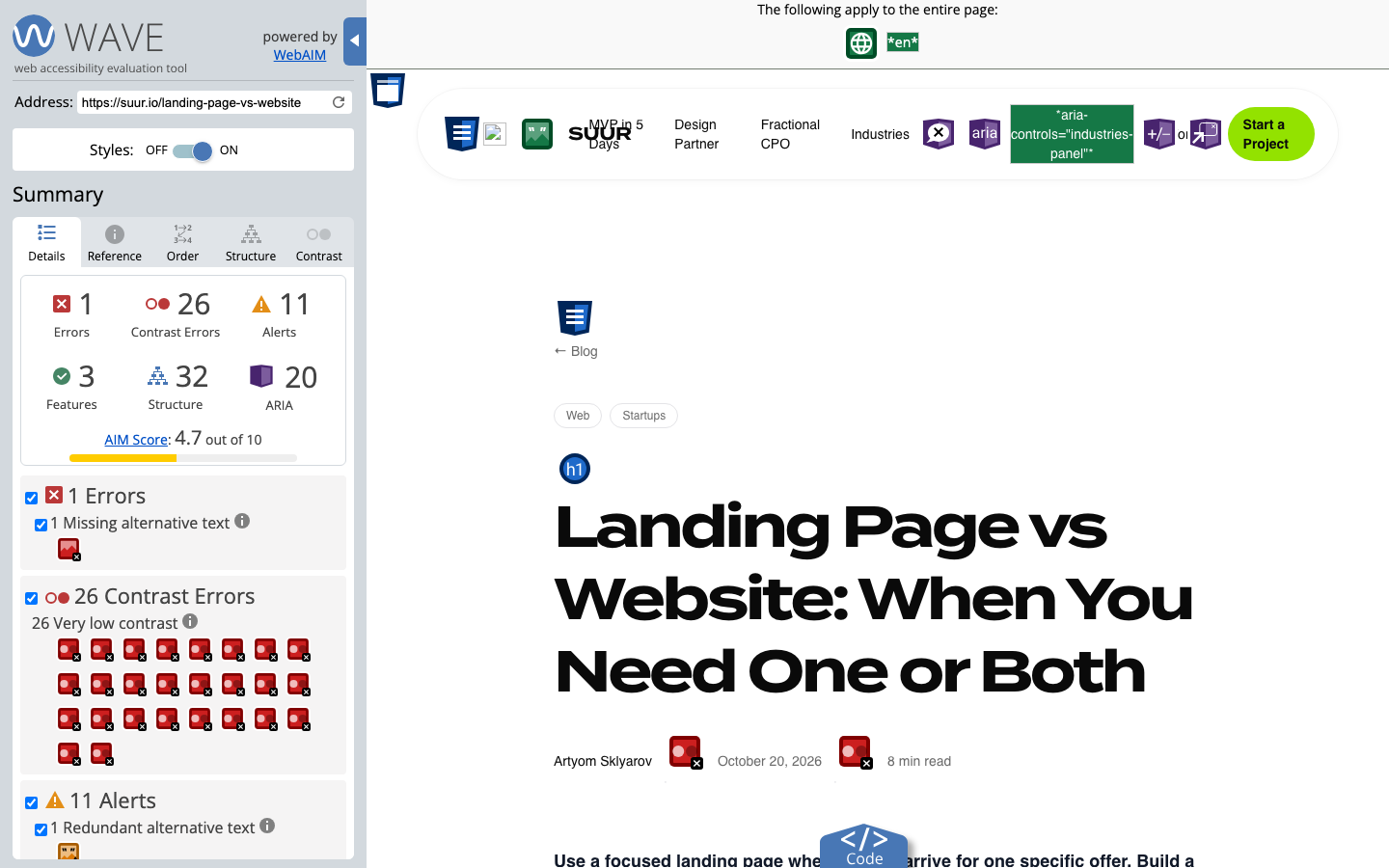
That changed representation matters. WAVE's official help explains that the online tool may not apply all scripting, extensions evaluate rendered pages, and inserted indicators can disrupt the layout. The screenshot therefore supports what WAVE displayed, not a conclusion that the live page always looks this way.
Treat each flag as a lead: locate the element, inspect its role and verify it in the relevant page state. A missing-alt flag needs an image-purpose check, not an automatic instruction to add descriptive text to every image. A report with no flagged errors would still need human review; automated output is not accessibility certification.
Microsoft Clarity: investigating visitor behavior
Choose Clarity when the question requires observed use: what visitors click, how they scroll or where an interaction appears to stall. It cannot provide that evidence simply by scanning a URL.
Microsoft's FAQ describes Clarity as free, without a traffic cap or required paid upgrade. It requires installation and visitor activity. Its session replays reconstruct HTML and recorded events rather than capturing literal video. We did not install Clarity or inspect visitor sessions for this article.
Plan masking, consent configuration and access to recordings before collection. Then define a narrow question, such as whether visitors can find and complete the enquiry form. Review relevant sessions alongside the form's actual success or failure records.
A replay may show repeated clicks; it cannot by itself tell you why the visitor clicked or prove that a redesign increased conversions. Use it to form a hypothesis and identify a task to investigate. For a new site with no visitor activity, a direct walkthrough and page checks can provide evidence sooner than waiting for a replay dataset.
Reading our reports without averaging the scores
The useful result of this exercise is a shortlist of things to verify. Lighthouse's accessibility score of 96 and WAVE's contrast count are different outputs from different page representations. Averaging them would produce a number with no useful interpretation.
Here is how we would turn the retained evidence into investigation work:
- Contrast: Lighthouse reported the small share label at 2.81:1, using
#9a9a9aon white, and a lime price at 1.53:1 on a warm background. Inspect the actual elements, computed colors, size and state before deciding on the repair. Check other uses of the same styles if the problem is shared. - Link wording: The report identified the generic “Learn more” link pointing to
/mvp. Review its surrounding context and choose wording that makes the destination clear. This is a specific content inspection, not evidence of a ranking loss. - Console error: Lighthouse captured React error #418. Reproduce it with browser diagnostics and check the affected interactions. The report alone doesn't establish its cause, frequency or effect on visitors.
- WAVE representation: Compare the missing-alt flag and broken-logo representation with the normal rendered page, using an extension or manual inspection as appropriate. Don't discard the flag merely because the representation differs.
These are proposed follow-up checks. This article does not claim the findings were fixed or retested. The reports also don't establish the condition of every other page on the site.
A practical starting stack and retest workflow
For a small public site, start with a representative page in Lighthouse and an accessibility inspection in WAVE, then manually complete the important task. Add a crawl when the question involves coverage across URLs. Choose a desktop or hosted workflow based on access, configuration and the review you need to repeat. Add visitor-behavior analysis when there is activity to investigate and collection is configured appropriately.
Keep a short findings log rather than collecting dashboards. Each entry should contain the URL, date, page state, tool version where available, observed evidence, user impact to verify, owner and next check.
Prioritize confirmed problems by impact and reach. A blocked enquiry form deserves attention even if no headline score changes. A shared contrast style may affect several templates. A low-confidence flag should get a verification task rather than an unquestioned implementation ticket.
After a change, repeat the relevant check under comparable conditions and manually test the affected journey. Preserve the before-and-after evidence. For performance, use repeated measurements before treating a small score movement as meaningful. For accessibility, a cleared automated flag doesn't replace keyboard and other appropriate human testing.
Our free website accessibility checker is a separate source-HTML triage tool: it doesn't render a browser or provide a compliance score. It can support an initial inspection but doesn't substitute for the rendered checks discussed here. The website redesign checklist can help organize accepted findings into release work; use the SEO migration planner when that work changes URLs.
Start with the smallest set of tools that can answer your question. The deliverable is an evidence-backed decision and a verified change, not a folder of scores.
Sources, commercial interests and corrections
Want to talk to SUUR directly?
We work with founders shipping product, not just decks.