Five Landing Page Elements: A Practical Review Framework
Review a landing page through five questions: is the offer clear, is the problem recognizable, is the product represented honestly, is the proof verifiable, and are the next step's conditions visible? This is a practical framework, not a requirement for five separate sections on every page. Adapt it to the visitor's intent and the offer. An invented testimonial or a trial button on a plan without a trial misrepresents the product; this article makes no claim that deception improves conversion. The examples below come from the InFlight launch site and our October 6, 2026 checks.
The rule under all five: say only what is true
Key Takeaways
- State the offer and next step clearly.
- Show the actual product and verifiable proof.
- Put conditions beside the claim they qualify.
- Treat the InFlight screenshot as dated project evidence, not a current price quote.
The first version of this post, from 2024, recommended the usual tactics: a free-trial CTA, a customer count, a refund line in the pricing block. All reasonable, and all dangerous when they are copied as template text instead of written from the facts of the product. A trial button on a product with no trial is not a conversion tactic. It is a false statement with a button on it.
So the test for every element below is the same: could a sceptical visitor verify this in two minutes? If yes, it belongs. If not, rewrite it until it is true or cut it.
If your page also receives paid traffic, Google grades a related set of qualities. We covered what Google's documentation actually says, with our own page-speed numbers, in which attribute describes a good landing page experience. This post is about the structure of the page itself.
1. The hero: one outcome, one action
The hero has one job: tell the visitor what they get and give them one obvious next step.
- Headline: the outcome, in words a customer would use. Not the product category, not a slogan.
- One line of support: what the product is and who it is for.
- One primary action: the button that matches the page's single goal. Secondary links are fine, a second equal-weight button is not.
- One honest visual: the product, the person using it, or the place it is used.
The InFlight launch site, for a stretching app built for airplane seats, opens with the line "Feel better before you land", a photograph of the coach seated by an aircraft window, and a Download on the App Store badge. On a phone the order changes on purpose: headline and App Store badge first, then the photograph, because on a small screen the action should not sit below an image.
2. The problem, in the visitor's words
Before you present a solution, show the visitor you understand the situation they are in. Describe the status quo, what it costs them, and why the usual workaround does not work.
The trap here is agitation that tips into invention. "You are losing thousands every month" is only useful if it is true for the person reading. Better sources for this section are sales-call notes, support emails and reviews of competing products, because they contain the phrases customers actually use. If your problem section reads like your internal strategy deck, rewrite it in those phrases.
3. The product, shown as it really is
Label the evidence accurately: a render is a render, an animation is a demonstration and a working browser demo should actually respond. A visual can explain an intended product without pretending it is already live.
On the InFlight launch site, the routines section has a Seated or Standing switch that changes the photograph and the copy, and lists a few real movements from the app. It is labelled as a glimpse, because that is what it is. Nothing on the site pretends to run a routine in the browser, and the photographs are never called videos. The app section uses one real screenshot of the routine player, framed plainly, next to three sentences about what it does.
We chose a real screenshot so visitors could inspect the interface and compare it with the App Store listing. Whether that works better than a clearly labeled animation would require a comparison; the project record does not establish one.
4. Proof the visitor could check
Make proof specific and traceable where consent and confidentiality allow: explain the relationship behind a logo, give numbers a date and source, and identify the context of a testimonial. Anonymous feedback may be legitimate, but the page should explain the limitation instead of implying independently inspectable evidence.
Our own landing page offer leads with one receipt rather than a wall: Biteful, a restaurant-supply startup whose brand and site we shipped in three weeks, and whose founders raised $125K within six weeks of launch. We state that as a sequence of events, not as a claim that the website raised the money. That distinction is what keeps proof credible: say what happened and let the reader draw the conclusion.
Our editorial preferences for this section, not experimentally established conversion rules:
- Choose a few relevant testimonials whose wording and permission you can verify; there is no required count.
- Every number gets a date or a source.
- Link a case study when it gives useful scope, evidence and limitations beyond a short quote.
5. The offer, and the answer to the last objection
The final section is where the visitor decides, so it has to answer the question they are actually asking: what does this cost, what do I get, and what happens if it is wrong for me?
On 6 October 2026 the InFlight pricing section shows annual access at $24.99 a year marked "Billed annually. No trial.", weekly and monthly plans each marked "7-day trial for eligible users", permanent access stated as having no trial, and a line telling the reader to confirm the current price and offer eligibility in the App Store. The free routines are named. Each claim is attached to the plan it applies to, and the trial wording says "eligible", because whether a person gets a trial depends on their history, not on the product.
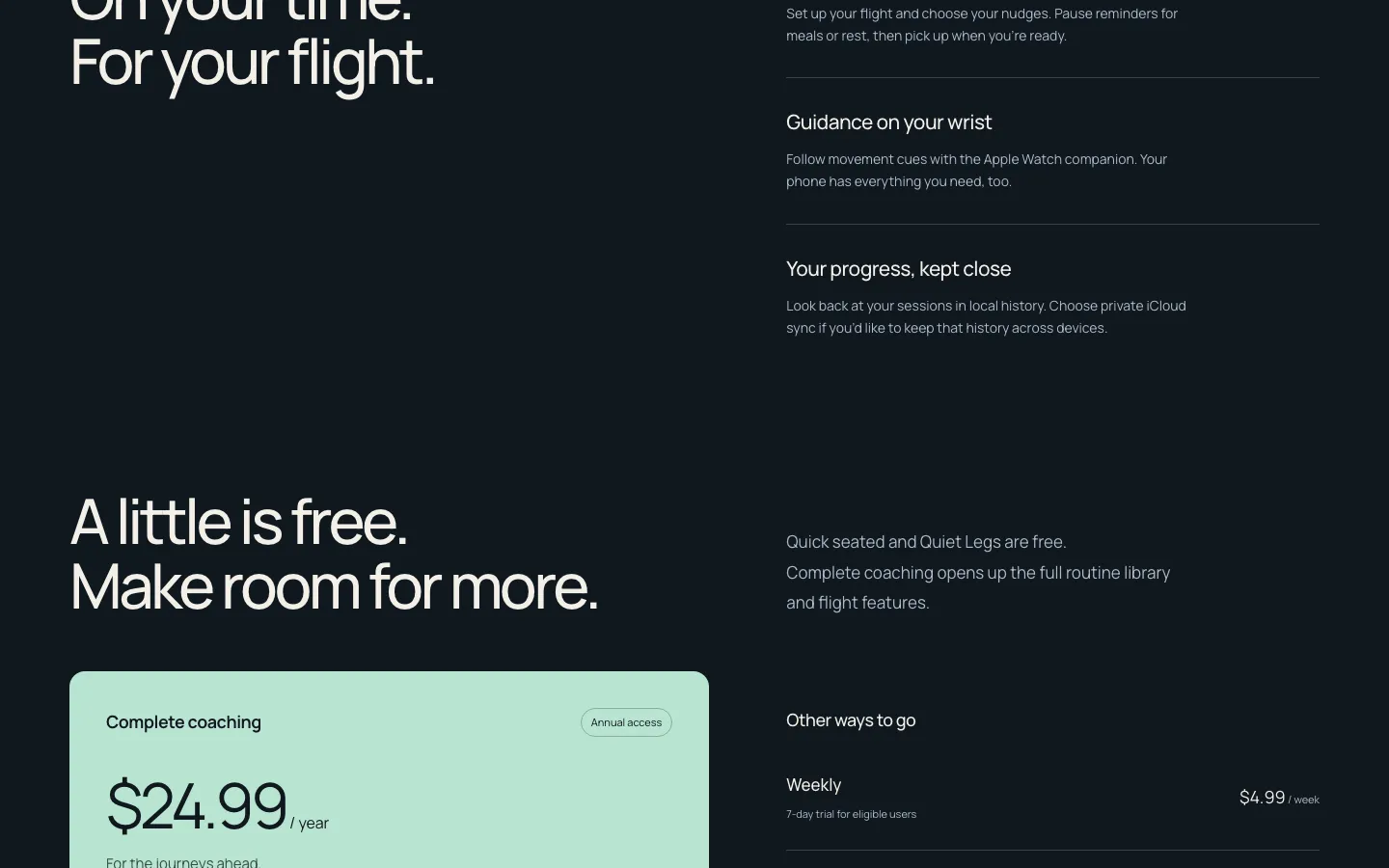
The same thinking applies to any offer. If you have a guarantee, state its terms. If you have a trial, state who gets it. If you do not have one, do not imply it. Then add the short FAQ that handles the objections your sales or support inbox hears most often, written from how the product actually behaves.
Speed and the mobile layout are part of every element
The elements still need to work on a phone. The InFlight launch-site case study records a Lighthouse mobile performance score of 98, an automated accessibility score of 100 and 186 KiB total in that audit. These are dated lab results, not proof of full accessibility conformance or current field performance. Use Core Web Vitals for the performance definitions and WCAG guidance for actual accessibility checks.
The short answer
Use the five questions to inspect the page, combining or omitting sections according to the offer and visitor's intent. Ask an unfamiliar reader to explain the offer and next step without assistance. Record where they hesitate, then test the corrected page. This is an exploratory comprehension check, not a conversion experiment.
Have a product idea?
Designed, built, and shipped in about 5 days.