Design Systems for Startups: Build and Keep One
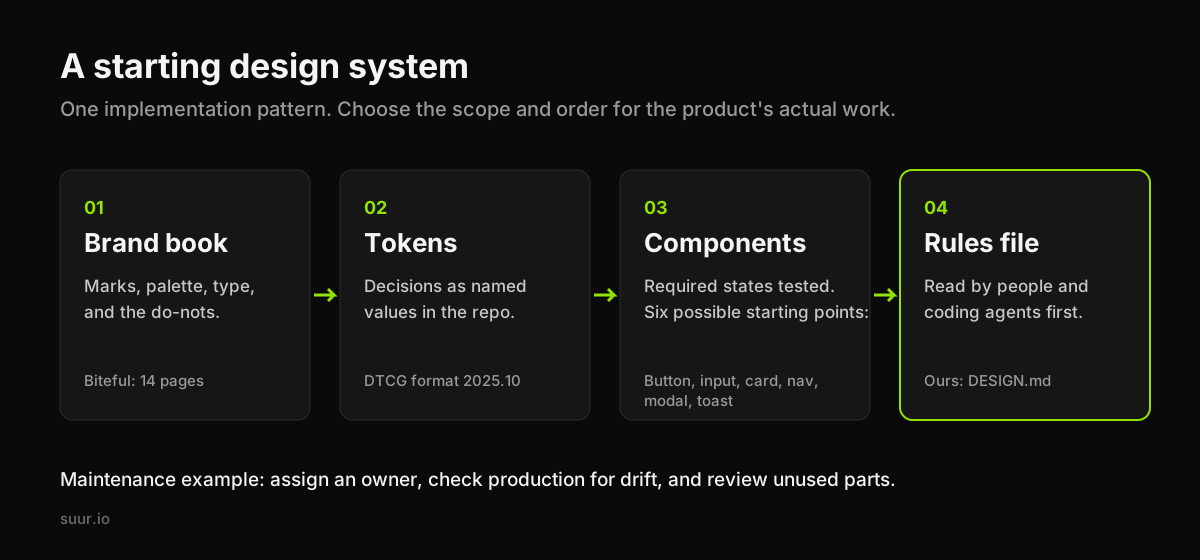
A startup keeps its brand consistent by putting its decisions where screens are built: named tokens, reusable components and rules people can inspect. Our starting pattern is a short brand book, a token file, the components the product actually uses and a written guide. The Biteful identity came with a 14-page book; our October 6, 2026 stylesheet check still found its Termina/Poppins pairing and lime/forest palette. That is a specific continuity observation, not proof that every team needs the same system size.
Key Takeaways
- Encode recurring decisions in production components and tokens.
- Give changes an owner and review states, not only default screens.
- Expand the system when repeated work and coordination justify it.
This post is about the startup version: what to build first and how to keep it alive. For the full definition, the four layers, and how a design system differs from a style guide or a UI kit, read what is a design system. Here we assume the definition and focus on brand consistency from day one to Series A.
Why startup brands drift
One source of brand drift is independent implementation. A founder, contractor, engineer or coding agent may each choose a slightly different blue, radius or button style when the shared decision is hard to find. Inspect repeated inconsistencies before deciding whether the problem is missing guidance, missing components or a deliberate exception.
The fix is not a bigger brand guide. A PDF tells people what to do and cannot stop them doing something else. The fix is to make the correct choice the easiest one, which means the brand decisions have to exist where the screens are built: as named values in code.
The minimum system, in the order to build it
1. The brand book: decisions, not decoration
Start from the identity. A useful startup brand book is specific: the marks and where each one is used, the palette with which color is for action and which is for surfaces, the type pairing with sizes, and the do-nots. When we built the Biteful identity, we sketched six logo directions, retired five, and kept the one that still read at 16 pixels. The resulting book was 14 pages, a project-specific scope rather than a recommended page count. When we checked the live biteful.app stylesheet on 6 October 2026, it still used Termina, Poppins and the same lime. That check establishes continuity in those values, not adherence to every rule in the book.
If the identity is unsettled, identify which decisions the system needs now. A startup branding project can produce the book and assets; teams can also establish provisional accessible styles while broader brand work continues.
2. Tokens: the decisions as named values
Tokens are the brand book translated into names the code uses: color-accent, color-surface, font-heading, radius-md, space-4. The value lives in one place. Every component refers to the name. Change the accent once and every button follows.
The Design Tokens Community Group's 2025.10 format describes a shared token representation. It is a community-group specification, not a W3C Recommendation. Tool support and transformations still need checking; a shared format does not automatically synchronize every design file and codebase.
For example, a CSS implementation might use --color-action for the semantic role rather than spreading an accent hex value across buttons. Document the role, allowable backgrounds and states, then make components consume it. The interchange format and the runtime representation need an explicit mapping.
A practical starting set follows the product's needs. This site's example is eight color tokens, five font families, five breakpoints and a five-step radius scale. That is not a ceiling for another startup: themes, accessibility states, platforms and existing components may require a different set.
3. Components: only the ones you have built twice
Start with components the product actually uses. Buttons, inputs, cards, navigation, modals and toasts are candidates, not six requirements for every product. Document applicable states such as focus, disabled, loading and error. Repeated use is a useful review trigger: compare whether the two instances share behavior before combining them. A single critical component may also justify shared maintenance.
Building a broad library before its use is clear risks maintenance work for components that never ship. A smaller set tied to current tasks can be easier to maintain. Neglected documentation and unclear ownership are separate risks even for a small system.
4. The rules file: written for people and for agents
The last layer is a plain document in the repository that says how to use the rest: which color carries the accent and where it is not allowed, how many button variants exist, what a form error looks like, what never to do. On this site it is a file called DESIGN.md at the root of the repo, and the rule is the same for designers, developers and coding agents: read it before any visual decision.
A coding agent can introduce a new value even when an existing token would fit. A rules file gives reviewers and tools a shared reference; it still needs enforcement through inspection and appropriate automated checks.
How to keep it alive after launch
Estimate the initial system from the components, platforms and states in scope. A small foundation and a migration of an existing product are different jobs. Include ongoing ownership in the estimate. These four habits are our suggested starting practice.
One owner. Someone, often the one designer or the most design-minded engineer, decides what enters the system. Without an owner it becomes a shared folder everyone adds to and nobody prunes.
Code is the source of truth. When Figma and production disagree, production wins and Figma gets updated. The opposite policy produces a beautiful design file of a product that does not exist.
A drift check in review. Ask why a pull request adds a raw hex value, a new font size or a one-off button. Some exceptions are intentional; record them and inspect the rendered result.
A quarterly prune. Every quarter, list components that have only one use and tokens nobody references. Merge or delete them. Systems get heavier by default and only get lighter on purpose.
Icons are the place this shows most clearly. The Apstra icon system we design and steward has 115 icons across five product domains, drawn on one grid with one stroke weight. It stays consistent because there is a dictionary: every concept has one icon, every icon has one meaning, and a new feature looks in the dictionary before it draws something new. That is the whole maintenance model in miniature.
When a startup needs a full system
Review whether the starting system needs expansion when any of these become true:
- More than two people, or any agent, ship front-end screens every week.
- The product has passed roughly twenty screens and the same component keeps being rebuilt.
- You are about to hire designers or engineers who were not in the room when the decisions were made.
- Marketing and product look like different companies.
Those are review triggers, not universal economic thresholds. Estimate the repeated implementation and coordination work, then compare it with maintaining a larger system. Keep code and design documentation aligned, including states, patterns and permitted exceptions. A full library that nobody maintains can cost more than a small, coherent one.
Mistakes we see most often
- Starting with Figma components instead of tokens. You end up with pictures of buttons that the code does not share.
- Adopting a public system without checking fit. Material, Polaris and Carbon provide useful patterns, but assess their behavior, theming, accessibility and maintenance requirements against your product. Using one does not necessarily make the result resemble its sponsor.
- No states. A button with only a default state is a drawing, not a component. Error, loading and disabled are where consistency usually breaks.
- Documenting everything. The rules file should be short enough to read in five minutes. If it is not read, it does not exist.
The short answer
A startup keeps its brand consistent through named decisions, reusable behavior and ownership. Repeated use is a useful signal for adding a component, and growing coordination is a reason to review the system's scope. Check the real workload before expanding it.
Have a product idea?
Designed, built, and shipped in about 5 days.